The Web Cryptography API provides several methods in the window.crypto namespace that allow an application to hash, sign and verify, encrypt and decrypt data, import and export keys, generate keys and key pairs, and wrap and unwrap keys. It also provides access to a cryptographically sound random number generator.
Browser support for the Web Cryptography API is excellent. All modern browsers support it, including mobile browsers. Check the current support status on caniuse.com.
Example application 
The application I demonstrate in this blog post is a trivial password manager implemented with the Ionic framework on the client and Spring Boot on the server.
This is an educational cryptography example, not a production password-manager design. In particular, it deterministically uses the username as the PBKDF2 salt and derives a bearer-style authentication key from the same password. If an attacker obtains the server-side authentication keys, known usernames let them test password guesses offline. A production design needs a random per-user salt stored alongside the account, a reviewed authentication protocol, rate limiting, recovery and key-rotation designs, and independent security review.
The user logs in with a username and a password. The application then fetches the password data stored on the server and displays it in a list. The user can now add new entries and modify existing ones. Every time the user changes something, the data is sent to the server. This application does not store anything on the client.
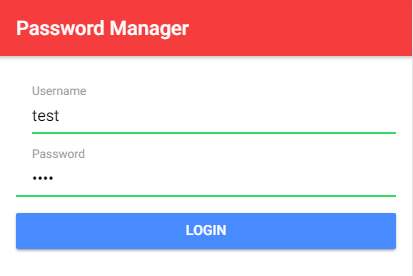
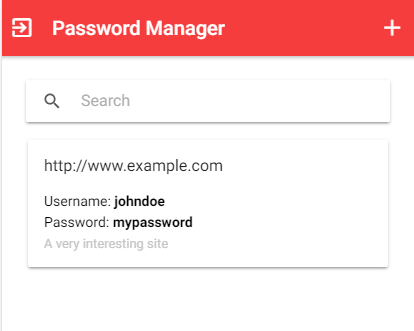
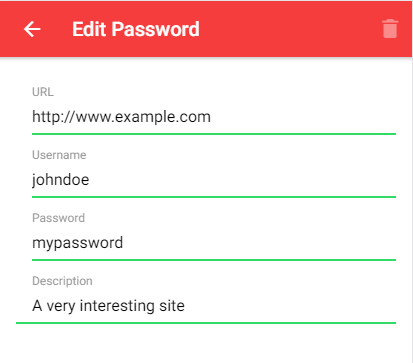
On the server-side, I use a Spring Boot application that stores the data from the users. To keep things simple, the data is stored in memory in a Map.
Overview 
Here is an overview of how the application works:
- The user enters a username and password.
- The app runs the password through 600,000 iterations of PBKDF2 SHA-256 with the username as the salt and derives 64 bytes of key material.
- The app imports the first 32 bytes as the AES-GCM master key for encryption and decryption.
- The app uses the remaining 32 bytes as the authentication key.
- The app fetches the stored data from the server with the authentication key (step 4).
- The app displays the passwords.
- The user adds new records and modifies existing entries.
- Each time the user changes something, the application compresses and encrypts the password data with the master key (step 3) and sends the blob, together with the authentication key, to the server.
- The server stores the data into a Map with the authentication key as the key and the encrypted data block as the value.
The sample currently uses 600,000 PBKDF2 SHA-256 iterations. Treat that as a baseline that you should still re-evaluate against current hardware and security guidance.
Client 
I started the client application with the Ionic blank starter template and added a few additional libraries.
npm install fflate
This is a small ESM-friendly compression library. The sample uses it to gzip the JSON payload before encrypting it.
npm install uuid
The application uses this library for assigning a unique identifier to each newly created record.
All code that handles the cryptography is bundled in the PasswordService class
import { Service } from '@angular/core';
import { gunzipSync, gzipSync, strFromU8, strToU8 } from 'fflate';
import { environment } from '../environments/environment';
import { Password } from './password';

@Service()
export class PasswordService {
  private readonly ivLen = 12;
  private readonly pbkdf2Iterations = 600_000;
  private readonly derivedKeyLength = 64;

  private passwords = new Map<string, Password>();
  private masterKey: CryptoKey | null = null;
  private authenticationKey: Uint8Array | null = null;
  private readonly textEncoder = new TextEncoder();
  private loggedIn = false;
The ivLen variable specifies the length of the initialization vector that is needed for the AES-GCM algorithm. The passwords Map stores the records with the password data. The authenticationKey is the key that the application sends to the server, and the masterKey is used for client-side encryption and decryption and never leaves the client. The textEncoder is used for string to Uint8Array conversions.
  async fetchPasswords(username: string, password: string): Promise<void> {
    await this.initKeys(username, password);

    const response = await fetch(`${environment.serverUrl}/fetch`, {
      headers: {
        'Content-Type': 'application/octet-stream',
      },
      method: 'POST',
      body: this.authenticationKey
        ? new Blob([this.authenticationKey.buffer.slice(0) as ArrayBuffer])
        : null,
    });

    if (!response.ok) {
      throw new Error(`Failed to fetch passwords: ${response.status}`);
    }

    const arrayBuffer = await response.arrayBuffer();
    if (arrayBuffer.byteLength > 0) {
      await this.decrypt(arrayBuffer);
    }
    this.loggedIn = true;
  }
The fetchPasswords() method is called immediately after the user enters the username and password. It calls the initKeys() method to initialize the authentication and master keys and then sends a POST request to the server to fetch the stored data. The body of the POST request contains the authentication key.
When the server sends a response back, the method calls decrypt() to decrypt the data.
  private async initKeys(username: string, password: string): Promise<void> {
    const salt = this.textEncoder.encode(username);
    const importedPassword = await crypto.subtle.importKey(
      'raw',
      this.textEncoder.encode(password),
      'PBKDF2',
      false,
      ['deriveBits'],
    );

    const derivedBits = await crypto.subtle.deriveBits(
      {
        name: 'PBKDF2',
        salt,
        iterations: this.pbkdf2Iterations,
        hash: 'SHA-256',
      },
      importedPassword,
      this.derivedKeyLength * 8,
    );

    const derivedBytes = new Uint8Array(derivedBits);
    this.masterKey = await crypto.subtle.importKey(
      'raw',
      derivedBytes.slice(0, 32),
      { name: 'AES-GCM', length: 256 },
      false,
      ['encrypt', 'decrypt'],
    );
    this.authenticationKey = derivedBytes.slice(32);
  }
The initKeys() method is responsible for creating the master and authentication keys. It takes the username and password as arguments. First, it converts the username to a Uint8Array object because it uses the username as salt for the PBKDF2 algorithm.
Then it calls importKey() to import the password bytes as a PBKDF2 base key. After that, deriveBits() derives 64 bytes from the password with PBKDF2 SHA-256, 600,000 iterations, and the username as the salt.
The code splits these 64 bytes into two halves. It imports the first 32 bytes as a non-extractable AES-256 key for AES-GCM encryption and stores the remaining 32 bytes directly in the instance field authenticationKey. This keeps the derivation flow shorter while still separating the encryption key from the authentication key material.
  private async encryptAndStore(): Promise<void> {
    if (this.authenticationKey === null) {
      return Promise.reject('authentication key is null');
    }

    const encryptedData = await this.encrypt();
    const authKeyAndData = this.concatUint8Array(this.authenticationKey, encryptedData);

    const response = await fetch(`${environment.serverUrl}/store`, {
      headers: {
        'Content-Type': 'application/octet-stream',
      },
      method: 'POST',
      body: new Blob([authKeyAndData.buffer.slice(0) as ArrayBuffer]),
    });

    if (!response.ok) {
      throw new Error(`Failed to store passwords: ${response.status}`);
    }
  }
The encryptAndStore() method is called each time the user adds, modifies, or deletes an entry. The method first calls encrypt(), which returns a Uint8Array that holds the encrypted data. Then, it concatenates the authentication key and the encrypted data block together and sends them with a POST request to the server.
  private async encrypt(): Promise<Uint8Array> {
    if (this.masterKey === null) {
      return Promise.reject('master key is null');
    }

    const compressed = gzipSync(strToU8(JSON.stringify([...this.passwords])));
    const plaintext = compressed.buffer.slice(
      compressed.byteOffset,
      compressed.byteOffset + compressed.byteLength,
    ) as ArrayBuffer;

    const initializationVector = new Uint8Array(this.ivLen);
    crypto.getRandomValues(initializationVector);

    const encrypted = await crypto.subtle.encrypt(
      {
        name: 'AES-GCM',
        iv: initializationVector,
      },
      this.masterKey,
      plaintext,
    );

    return this.concatUint8Array(initializationVector, new Uint8Array(encrypted));
  }
The encrypt() method converts the passwords array to a JSON string, compresses it with the fflate library, and then encrypts it with the AES-GCM algorithm. AES-GCM needs an initialization vector (iv) for its work. This is an array, with the recommended size of 12 bytes, that is filled with random data. Your code must never use the same iv with the same key to encrypt a message. The application uses the Web Cryptography random generator to fill the IV array. crypto.getRandomValues() is synchronous, as is the newer crypto.randomUUID() convenience method. The cryptographic operations exposed through crypto.subtle are asynchronous.
The crypto.subtle.encrypt() method expects three parameters: an object that describes and configures the algorithm, a CryptoKey object containing the key, and the data block in plaintext to be encrypted.
The initialization vector does not have to be secret, and the decryption process needs to use the same iv to decrypt the message successfully. Therefore, the application joins the iv together with the encrypted data block.
  private async decrypt(buffer: ArrayBuffer): Promise<void> {
    if (this.masterKey === null) {
      return Promise.reject('master key is null');
    }

    const iv = buffer.slice(0, this.ivLen);
    const data = buffer.slice(this.ivLen);

    const decrypted = await window.crypto.subtle.decrypt(
      {
        name: 'AES-GCM',
        iv,
      },
      this.masterKey,
      data,
    );

    const uncompressed = strFromU8(gunzipSync(new Uint8Array(decrypted)));
    this.passwords = new Map(JSON.parse(uncompressed));
  }
The decrypt() method does the same as the encrypt() method but in reverse order. First, it extracts the iv from the data block. Then it decrypts the data blob, decompresses it, and parses the string with JSON.parse.
crypto.subtle.decrypt() expects three parameters: an object that configures the encryption algorithm, the key, and the encrypted data block. The algorithm parameters must match the encryption operation (most importantly, the same IV), and the key must contain the same secret key material. They do not have to be the identical JavaScript object instances used during encryption.
  private concatUint8Array(...arrays: Uint8Array[]): Uint8Array {
    let totalLength = 0;
    for (const arr of arrays) {
      totalLength += arr.length;
    }
    const result = new Uint8Array(totalLength);
    let offset = 0;
    for (const arr of arrays) {
      result.set(arr, offset);
      offset += arr.length;
    }
    return result;
  }
concatUint8Array() is a helper method that takes an arbitrary number of Uint8Array objects and concatenates them together. The application uses this method to join the authentication key, iv, and encrypted data block together.
This concludes the part of the client application that handles the cryptography. You can find the source code for the complete application on GitHub:
https://github.com/ralscha/blog/tree/master/pwmanager
Server 
The server is a Spring Boot application where I implemented one Controller class with two HTTP endpoints (/fetch and /store). The db instance field is our database and maps the encrypted data blobs to the authentication key.
@RestController
@CrossOrigin
public class PwManagerController {

  private final Map<ByteBuffer, byte[]> db = new ConcurrentHashMap<>();

  @PostMapping("/fetch")
  public byte[] fetch(@RequestBody byte[] authenticationKey) {
    ByteBuffer key = ByteBuffer.wrap(authenticationKey);
    return this.db.get(key);
  }
The fetch method takes the authentication key and returns the encrypted data blob it finds in the map. Java permits a byte[] as a Map key, but arrays inherit identity-based equals() and hashCode(), so a different array with the same bytes would not match. Wrapping the bytes in a ByteBuffer gives this example content-based equality and hashing.
  @PostMapping("/store")
  public void store(@RequestBody byte[] payload) {
    byte[] keyBytes = Arrays.copyOfRange(payload, 0, 32);
    byte[] value = Arrays.copyOfRange(payload, 32, payload.length);
    ByteBuffer key = ByteBuffer.wrap(keyBytes);
    this.db.put(key, value);
  }
The store() method takes the encrypted blob and stores it into the map. The client prepends the encrypted data blob with the authentication key. This key has a size of 32 bytes (256 bits). The code takes the first 32 bytes and uses them as the map key and stores the rest of the data block as the value in the Map.
Disclaimer 
I'm not a security expert. Be cautious when you copy code from this example, double-check every line I wrote, and read the Web Cryptography API documentation thoroughly.
Send me feedback if there are errors in my explanations.