This blog post shows how to build a small polling application where users can vote for their favorite operating system and see the result update live in a pie chart.
The frontend is a small JavaScript application bundled with Vite. The backend is a Spring Boot application that stores the counters in MapDB and pushes updates to all connected browsers with server-sent events.
Stack 
Client 
| Library | Homepage |
|---|---|
| Vite | https://vite.dev/ |
| ECharts | https://echarts.apache.org/en/index.html |
| Web Crypto API | https://developer.mozilla.org/en-US/docs/Web/API/Crypto/randomUUID |
Server 
| Library | Homepage |
|---|---|
| Maven | https://maven.apache.org/ |
| Spring Boot | https://spring.io/projects/spring-boot |
| sse-eventbus | https://github.com/ralscha/sse-eventbus |
| MapDB | https://mapdb.org/ |
Overview 
The visible part of the application is a page with a vote form and an ECharts pie chart.
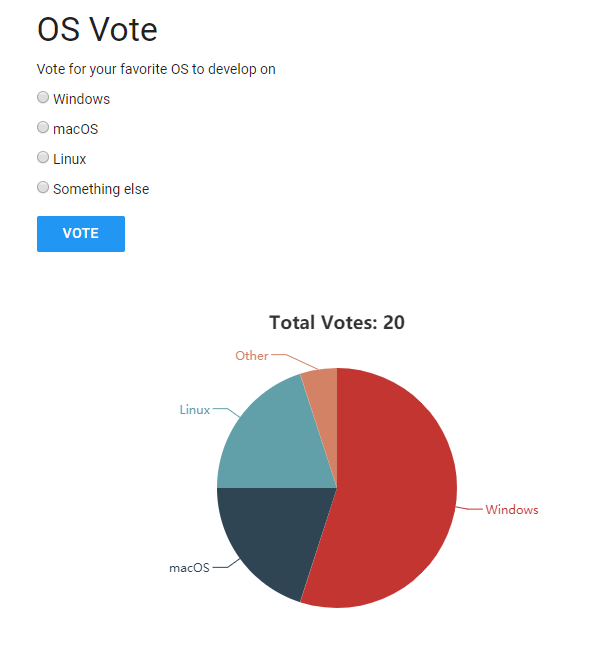
The browser sends the selected operating system to the server with a JSON POST request. It also opens a long-lived EventSource connection and listens for live updates.
The server persists the counters in a MapDB file and broadcasts the current snapshot to all connected browsers whenever a user votes.

Server 
Create the project on https://start.spring.io with the Spring Web MVC dependency. Then add sse-eventbus and MapDB to the Maven build.
  <dependencies>
    <dependency>
      <groupId>org.springframework.boot</groupId>
      <artifactId>spring-boot-starter-webmvc</artifactId>
    </dependency>
    <dependency>
      <groupId>ch.rasc</groupId>
      <artifactId>sse-eventbus</artifactId>
      <version>3.0.0</version>
    </dependency>

    <dependency>
        <groupId>org.mapdb</groupId>
        <artifactId>mapdb</artifactId>
        <version>3.1.0</version>
    </dependency>

  </dependencies>
The application entry point enables the SSE event bus with @EnableSseEventBus.
@SpringBootApplication
@EnableSseEventBus
public class Application {

  public static void main(String[] args) {
    SpringApplication.run(Application.class, args);
  }
}
Static resources are served from ../client/dist in development and from classpath:/static/ in production. The configuration applies different cache settings for index.html and the fingerprinted static files.
@Configuration
class ResourceConfig implements WebMvcConfigurer {

  private final Environment environment;

  ResourceConfig(Environment environment) {
    this.environment = environment;
  }

  @Override
  public void addResourceHandlers(ResourceHandlerRegistry registry) {
    if (this.environment.acceptsProfiles(Profiles.of("development"))) {
      String userDir = System.getProperty("user.dir");
      registry.addResourceHandler("/**")
          .addResourceLocations(Paths.get(userDir, "../client/dist").toUri().toString())
          .setCachePeriod(0);
    }
    else {
      registry.addResourceHandler("/index.html")
          .addResourceLocations("classpath:/static/")
          .setCacheControl(CacheControl.noCache()).resourceChain(false)
          .addResolver(new EncodedResourceResolver());

      registry.addResourceHandler("/**").addResourceLocations("classpath:/static/")
          .setCacheControl(CacheControl.maxAge(Duration.ofDays(365)).cachePublic())
          .resourceChain(false).addResolver(new EncodedResourceResolver());
    }
  }

  @Override
  public void addViewControllers(ViewControllerRegistry registry) {
    registry.addViewController("/").setViewName("redirect:/index.html");
  }

}
The main application logic lives in PollController. Its constructor opens the MapDB file and initializes the counters when the database is still empty.
  private static final List<OperatingSystem> OPERATING_SYSTEMS = List.of(
      OperatingSystem.WINDOWS, OperatingSystem.MACOS, OperatingSystem.LINUX,
      OperatingSystem.OTHER);

  private final SseEventBus eventBus;

  private final ObjectMapper objectMapper;

  private final DB db;

  private final ConcurrentMap<String, Long> pollMap;

  PollController(SseEventBus eventBus, ObjectMapper objectMapper) {
    this.eventBus = eventBus;
    this.objectMapper = objectMapper;

    this.db = DBMaker.fileDB("./counter.db").transactionEnable().make();
    this.pollMap = this.db.hashMap("polls", Serializer.STRING, Serializer.LONG)
        .createOrOpen();

    for (OperatingSystem operatingSystem : OPERATING_SYSTEMS) {
      this.pollMap.putIfAbsent(operatingSystem.label(), 0L);
    }
  }
The POST /poll endpoint accepts a JSON payload such as { "operatingSystem": "Linux" }, validates the input, increments the persisted counter, commits the change, and then triggers a broadcast.
  @PostMapping("/poll")
  @ResponseStatus(code = HttpStatus.NO_CONTENT)
  public void poll(@RequestBody VoteRequest voteRequest) {
    String label = voteRequest != null ? voteRequest.operatingSystem() : null;
    OperatingSystem operatingSystem = OperatingSystem.fromLabel(label);
    this.pollMap.merge(operatingSystem.label(), 1L, Long::sum);
    this.db.commit();
    sendPollData(null);
  }
The GET /register/{id} endpoint creates an SseEmitter for the browser and immediately sends the current snapshot to the newly connected client so the chart is populated right away.
  @GetMapping("/register/{id}")
  public SseEmitter register(@PathVariable("id") String id,
      HttpServletResponse response) {
    response.setHeader("Cache-Control", "no-store");
    SseEmitter sseEmitter = this.eventBus.createSseEmitter(id, SseEvent.DEFAULT_EVENT);

    // send the initial data only to this client
    sendPollData(id);

    return sseEmitter;
  }
The broadcast payload is a JSON document with a totalVotes field and a results array. The controller serializes this payload with Jackson 3 to JSON and sends it to all connected clients.
  private void sendPollData(String clientId) {
    var builder = SseEvent.builder().data(currentSnapshotJson());
    if (clientId != null) {
      builder.addClientId(clientId);
    }
    this.eventBus.handleEvent(builder.build());
  }

  private String currentSnapshotJson() {
    PollSnapshot snapshot = new PollSnapshot(
        OPERATING_SYSTEMS.stream().map(operatingSystem -> new PollResult(
            operatingSystem.label(),
            this.pollMap.getOrDefault(operatingSystem.label(), 0L))).toList());

    try {
      return this.objectMapper.writeValueAsString(snapshot);
    }
    catch (JacksonException e) {
      throw new IllegalStateException("Unable to serialize poll snapshot", e);
    }
  }
The Java build only packages the Spring Boot application. The frontend build is intentionally separate now: Vite writes the client files to client/dist, and Maven copies that directory into the Spring Boot static resource directory during prepare-package.
Client 
Initialize the client project with npm, create the src directory, and install ECharts.
mkdir src
npm install echarts
The main module initializes the chart, checks localStorage to decide whether the vote form should still be displayed, posts the selected value as JSON, and stores a small browser-local marker after a successful vote.
export function init() {
    const chart = echarts.init(elements.chart);
    chart.setOption(getChartOption());

    if (localStorage.getItem('hasVoted') === 'true') {
        showAlreadyVotedState();
    }
    else {
        showVotingState();
    }

    elements.voteButton.addEventListener('click', async () => {
        const selectedOption = document.querySelector('input[name=os]:checked');
        if (!selectedOption) {
            return;
        }

        try {
            await fetch('/poll', {
            method: 'POST',
                headers: {
                    'Content-Type': 'application/json'
                },
                body: JSON.stringify({ operatingSystem: selectedOption.value })
            });

            localStorage.setItem('hasVoted', 'true');
            showVoteSubmittedState();
        }
        catch (error) {
            console.error('Unable to submit vote', error);
        }
    });
The client id for the SSE registration uses crypto.randomUUID(), which is built into modern browsers through the Web Crypto API. The incoming server-sent event payload is parsed as JSON and applied directly to the chart.
    const eventSource = new EventSource(`/register/${crypto.randomUUID()}`);
    eventSource.addEventListener('message', ({ data }) => {
        const snapshot = JSON.parse(data);
        chart.setOption({
            title: {
                text: `Total Votes: ${snapshot.totalVotes}`
            },
            series: [{
                data: snapshot.results.map(({ label, votes }) => ({
                    value: votes,
                    name: label
                }))
            }]
        });
    }, false);

    window.addEventListener('beforeunload', () => {
        eventSource.close();
        chart.dispose();
    }, { once: true });
The localStorage check is enough for a demo, but it is only a convenience feature. A real application should enforce one vote per user on the server.
The page layout and styling are implemented with plain CSS, which keeps the example dependency-free apart from the charting library.
Vite handles bundling. Install the build tooling with:
npm install -D vite
The Vite configuration uses src as the project root and writes the production build to dist.
import { defineConfig } from 'vite';

export default defineConfig({
  root: 'src',
  server: {
    proxy: {
      '/poll': 'http://localhost:8080',
      '/register': 'http://localhost:8080'
    }
  },
  build: {
    outDir: '../dist',
    emptyOutDir: true
  }
});
The build and watch scripts are enough for this example.
  "scripts": {
    "build": "vite build",
    "watch": "vite build --watch"
  },
vite build --watch only rebuilds files. It does not start a development server, which is exactly what we want here because Spring Boot serves the generated files. The controller is already annotated with @CrossOrigin, so the same backend can also serve a separately hosted frontend if needed.
Running the application 
During development, install the client dependencies and start the Vite watcher from the project root:
task client:install
task client:watch
Then start Spring Boot in a second terminal:
task server:run
If you do not use Task, run npm install && npm run watch in client and ./mvnw spring-boot:run -Dspring-boot.run.profiles=development in server.
Open http://localhost:8080 in the browser.
You can find the complete source code for the project on GitHub: https://github.com/ralscha/blog/tree/master/poll