In this blog post, we implement an authentication system with Spring Security that uses a username and password, plus TOTP (Time-based One-Time Password) as the second factor.
We will implement this system as a Spring Boot application. The application uses jOOQ to access the user information stored in a file-based H2 database.
The client is an Angular web application written in TypeScript and uses the UI library PrimeNG. However, the focus of this blog post is the Java code, so I won't discuss the client code in detail. The solution presented here should work with any client-side framework. If you are interested in the client code, you can find it on GitHub: https://github.com/ralscha/springsecuritytotp/tree/main/client
TOTP 
TOTP (Time-based One-Time Password) is a mechanism that adds a second factor to a username/password authentication flow to increase security.
TOTP is an algorithm based on HOTP (HMAC-based One-time Password) but uses a time-based component instead of a counter.
TOTP and HOTP depend on a secret that two parties share. The secret is a randomly generated token usually displayed in Base32 to the user. The server generates 20 random bytes (160 bits) with SecureRandom, stores the Base32 representation in the database during sign-up, and shows it to the user. The user then types or copies the secret into an authenticator app that supports TOTP.
Many TOTP apps are available for mobile devices, desktops, and browsers. I use the Google Authenticator on an Android device.
Demo application 
You can find the source for the demo application on GitHub:
https://github.com/ralscha/springsecuritytotp
The server directory contains the Spring Boot application and can be started from a shell with ./mvnw spring-boot:run (or mvnw.cmd spring-boot:run on Windows). The Angular application is located in the client folder; run npm install once and start it with npm start.
The first time you start the server, it creates the database and inserts three users.
| Username | Password | Secret |
|---|---|---|
| admin | admin | W4AU5VIXXCPZ3S6T |
| user | user | LRVLAZ4WVFOU3JBF |
| lazy | lazy |
The demo application supports users with and without second-factor authentication (2FA).
Install a TOTP authenticator app and create a new entry with the given secret.
You can either scan the QR code or enter the secret manually. The QR code is also "clickable" because the image is wrapped in an <a> tag with an otpauth:// href. Clicking such a link should open an installed authenticator app.
Base 
The server application is a regular Spring Boot application, created with Spring Initializr. I added security, jooq, flyway, and web as dependencies. Open the pom.xml to see all the dependencies.
The application uses jOOQ to access the database and Flyway for database migrations. The setup in this application follows the description in my blog post about jOOQ
The application uses a custom implementation of the TOTP algorithm, based on RFC 6238 behavior. You can find it in the CustomTotp class.
Database 
The demo application uses this table to store user information.
CREATE TABLE app_user (
    id            BIGINT NOT NULL AUTO_INCREMENT,
    username      VARCHAR(255) NOT NULL,
    password_hash VARCHAR(255),
    secret        VARCHAR(16),
    enabled       BOOLEAN not null,
    additional_security BOOLEAN not null,
    PRIMARY KEY(id),
    UNIQUE(username)
);
username and password_hash are used for the traditional username/password login (first factor).
secret is required for the second-factor authentication with TOTP. This is the code that the client and server have to share. You can see how the demo application exchanges this secret in the sign-up process.
The later V0003__strengthen_totp.sql migration expands that column for the stronger secret and adds last_totp_interval. The application records the interval of an accepted code in this field to reject immediate reuse of the most recently accepted TOTP interval.
ALTER TABLE app_user ALTER COLUMN secret VARCHAR(64);
ALTER TABLE app_user ADD COLUMN last_totp_interval BIGINT;
additional_security is an important flag used during the sign-in workflow. Initially, this flag is false. When a user enters the wrong TOTP code, this flag will be set to true, requiring additional security verification. You will learn more about this flag in the sign-in section.
enabled is used for the registration process. The sign-up workflow consists of two steps. The user is inserted into the database during the first step. But at this time, the application doesn't know if the user has finished the registration process. So the handler that inserts the user sets this flag to false. Because this flag is false, the user can't log in yet. When the user finishes the sign-up process successfully, the handler changes the value of this field to true.
Spring Security 
The application performs username/password and TOTP authentication in its own controllers, while Spring Security provides authorization, CSRF protection, logout, and persistence of the authenticated security context. A DelegatingSecurityContextRepository saves the context in both the request and HTTP session repositories.
  @Bean
  DelegatingSecurityContextRepository delegatingSecurityContextRepository() {
    return new DelegatingSecurityContextRepository(new RequestAttributeSecurityContextRepository(),
        new HttpSessionSecurityContextRepository());
  }
The application uses Argon2 for password hashing.
  @Bean
  PasswordEncoder passwordEncoder() {
    return new Argon2PasswordEncoder(16, 32, 1, 19 * 1024, 2);
  }
The Spring Security documentation recommends tuning the parameters to take about 1 second to verify a password on your system.
Note that Argon2PasswordEncoder is a class provided by the Spring Security library, but it depends on Bouncy Castle. Add the following dependency to your project.
    <dependency>
      <groupId>org.bouncycastle</groupId>
      <artifactId>bcprov-jdk18on</artifactId>
      <version>1.86</version>
    </dependency>
This demo leverages the traditional HTTP session with the session cookie approach. This is not a requirement for TOTP, and you can use other authentication workflows like JWT.
The application configures Spring Security with the following code.
  @Bean
  SecurityFilterChain filterChain(HttpSecurity http, CookieCsrfTokenRepository csrfTokenRepository) throws Exception {
    http.csrf(customizer -> customizer.csrfTokenRepository(csrfTokenRepository)
      .csrfTokenRequestHandler(new CsrfTokenRequestAttributeHandler()))
      .securityContext(
          securityContext -> securityContext.securityContextRepository(delegatingSecurityContextRepository()))
      .requestCache(cache -> cache.disable())
      .exceptionHandling(exceptions -> exceptions
        .authenticationEntryPoint(new HttpStatusEntryPoint(HttpStatus.UNAUTHORIZED)))
      .headers(headers -> headers
        .contentSecurityPolicy(csp -> csp.policyDirectives("default-src 'self'; script-src 'self'; "
            + "style-src 'self' 'unsafe-inline'; img-src 'self' data:; font-src 'self'; "
            + "connect-src 'self'; object-src 'none'; base-uri 'self'; frame-ancestors 'none'; form-action 'self'"))
        .referrerPolicy(policy -> policy.policy(ReferrerPolicy.NO_REFERRER))
        .frameOptions(frame -> frame.deny()))
      .authorizeHttpRequests(customizer -> {
        customizer.dispatcherTypeMatchers(DispatcherType.ERROR)
          .permitAll()
          .requestMatchers("/authenticate", "/signin", "/verify-totp", "/verify-totp-additional-security",
              "/signup", "/signup-pending", "/signup-confirm-secret", "/csrf")
          .permitAll()
          .requestMatchers("/", "/assets/**", "/svg/**", "/*.br", "/*.gz", "/*.html", "/*.js", "/*.css",
              "/*.woff2", "/*.ttf", "/*.eot", "/*.svg", "/*.woff", "/*.ico")
          .permitAll() // Permit all for these resources
          .anyRequest()
          .authenticated();
      })
      .logout(customizer -> customizer.logoutSuccessHandler(new HttpStatusReturningLogoutSuccessHandler()));
    return http.build();
  }
Because the application authenticates with a session cookie, it keeps Spring Security's CSRF protection enabled. CookieCsrfTokenRepository exposes the token in the XSRF-TOKEN cookie. Before every state-changing request, the Angular service calls /csrf; Angular's HTTP client then sends the cookie value in the X-XSRF-TOKEN header.
  private csrfToken(): Observable<string> {
    return this.httpClient.get('csrf', {
      responseType: 'text',
      withCredentials: true
    });
  }

  private post<T>(url: string, body: HttpParams | null): Observable<T> {
    return this.csrfToken().pipe(
      switchMap(() => this.httpClient.post<T>(url, body, {withCredentials: true}))
    );
  }
The code then configures a list of endpoints that don't need authentication. These are all part of the sign-up and sign-in workflow. I will describe these endpoints in more detail in the following sections.
Every endpoint that is not listed cannot be accessed without authentication.
Lastly, the application configures the logout handler. This handler by default sends back a redirect request, but for single-page applications, it is easier when the endpoint returns an HTTP status code. This is what HttpStatusReturningLogoutSuccessHandler does; it returns status 200 by default. You can change this by passing another code to the constructor.
Sign Up 
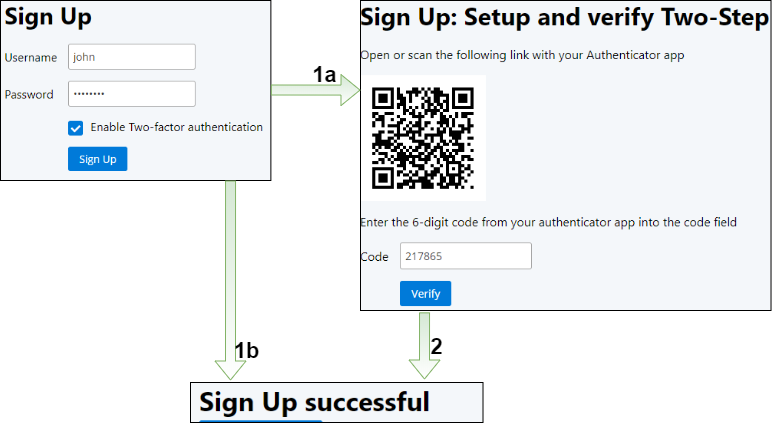
The sign-up workflow consists of three pages. On the first page, the user enters their username and password, and if they want to enable two-factor authentication. If they select the 2FA checkbox, the application displays a random secret as a QR code on the next page (1a). The user has to create a new entry in their authenticator app and enter the given secret. Then they have to verify the registration with the code the authenticator app shows them. Finally, the application displays a success message if the verification code is valid (2).
1. Username and Password 
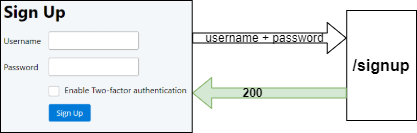
The client application sends the username, password, and the value of the 2FA checkbox to the /signup endpoint. Bean Validation rejects blank or oversized values, and the handler trims and lowercases the username before using it. It sends back a SignupResponse, which Spring converts to JSON.
  @PostMapping("/signup")
  public SignupResponse signup(@RequestParam("username") @NotBlank @Size(max = 255) String username,
      @RequestParam("password") @NotBlank @Size(max = 256) String password, @RequestParam("totp") boolean totp,
      HttpSession httpSession, HttpServletRequest request) {

    this.attemptLimiter.check("signup:" + request.getRemoteAddr(), 10);
    httpSession.removeAttribute(SessionKeys.PENDING_SIGNUP_USER_ID);
    httpSession.removeAttribute(SessionKeys.PENDING_AUTHENTICATION);
    String normalizedUsername = username.trim().toLowerCase(Locale.ROOT);
SignupResponse contains the following fields.
public record SignupResponse(Status status, String username, String secret) {

  enum Status {

    OK, USERNAME_TAKEN, WEAK_PASSWORD

  }

  public SignupResponse(Status status) {
    this(status, null, null);
  }

  @Override
  public String toString() {
    return "SignupResponse[status=" + this.status + "]";
  }

}
The /signup handler first checks case-insensitively whether the username is already registered. An unfinished TOTP enrollment can be resumed only when the caller selects TOTP again and supplies the matching password; this restores the pending user ID and existing secret in that browser session without generating a second account. Every other duplicate returns USERNAME_TAKEN.
    var existingUser = this.dsl.selectFrom(APP_USER)
      .where(APP_USER.USERNAME.equalIgnoreCase(normalizedUsername))
      .fetchAny();
    if (existingUser != null) {
      return resumeTotpSignup(existingUser, password, totp, httpSession, request);
    }
  private SignupResponse resumeTotpSignup(AppUserRecord existingUser, String password, boolean totp,
      HttpSession httpSession, HttpServletRequest request) {
    if (totp && Boolean.FALSE.equals(existingUser.getEnabled()) && isNotBlank(existingUser.getSecret())) {
      this.attemptLimiter.check("password:" + existingUser.getUsername().toLowerCase(Locale.ROOT), 10);
      if (existingUser.getPasswordHash() == null
          || !this.passwordEncoder.matches(password, existingUser.getPasswordHash())) {
        return new SignupResponse(SignupResponse.Status.USERNAME_TAKEN);
      }
      // A disabled account is not necessarily an unfinished enrollment. Recheck
      // its explicit enrollment state after password verification.
      var pending = this.dsl.select(APP_USER.USERNAME, APP_USER.SECRET, ENROLLMENT_EXPIRES_AT)
        .from(APP_USER)
        .where(APP_USER.ID.eq(existingUser.getId())
          .and(APP_USER.ENABLED.isFalse())
          .and(ENROLLMENT_PENDING.isTrue())
          .and(ENROLLMENT_EXPIRES_AT.gt(System.currentTimeMillis())))
        .fetchOne();
      if (pending != null) {
        request.changeSessionId();
        httpSession.setAttribute(SessionKeys.PENDING_SIGNUP_USER_ID,
            new PendingSignup(existingUser.getId(), pending.get(ENROLLMENT_EXPIRES_AT)));
        return new SignupResponse(SignupResponse.Status.OK, pending.get(APP_USER.USERNAME),
            pending.get(APP_USER.SECRET));
      }
    }
    return new SignupResponse(SignupResponse.Status.USERNAME_TAKEN);
  }
Next, the handler checks if the password conforms with the configured password policy. This application leverages the passpol library for this purpose. If the given password fails the policy check, the handler returns the status WEAK_PASSWORD.
    Status status = this.passwordPolicy.check(password);
    if (status != Status.OK) {
      return new SignupResponse(SignupResponse.Status.WEAK_PASSWORD);
    }
If the user selected 2FA, the handler creates the 160-bit secret, inserts the user with enabled=false, and returns OK with the normalized username and secret. It stores only the new user ID as pending enrollment state in the HTTP session; the confirmation endpoint later uses that binding instead of trusting a username supplied by the client. A database uniqueness violation is also handled in case two sign-up requests race.
    if (totp) {
      String secret = CustomTotp.randomSecret();
      long expiresAt = now + ENROLLMENT_LIFETIME_MILLIS;

      try {
        Long appUserId = this.dsl
          .insertInto(APP_USER, APP_USER.USERNAME, APP_USER.PASSWORD_HASH, APP_USER.ENABLED, APP_USER.SECRET,
              APP_USER.ADDITIONAL_SECURITY, ENROLLMENT_PENDING, ENROLLMENT_EXPIRES_AT)
          .values(normalizedUsername, this.passwordEncoder.encode(password), false, secret, false, true,
              expiresAt)
          .returningResult(APP_USER.ID)
          .fetchSingle(APP_USER.ID);
        request.changeSessionId();
        httpSession.setAttribute(SessionKeys.PENDING_SIGNUP_USER_ID, new PendingSignup(appUserId, expiresAt));
      }
      catch (IntegrityConstraintViolationException ex) {
        return new SignupResponse(SignupResponse.Status.USERNAME_TAKEN);
      }
      return new SignupResponse(SignupResponse.Status.OK, normalizedUsername, secret);
    }
If the user did not enable 2FA, the handler inserts the user and sets enabled to true. The user can now log in.
    try {
      this.dsl
        .insertInto(APP_USER, APP_USER.USERNAME, APP_USER.PASSWORD_HASH, APP_USER.ENABLED, APP_USER.SECRET,
            APP_USER.ADDITIONAL_SECURITY)
        .values(normalizedUsername, this.passwordEncoder.encode(password), true, null, false)
        .execute();
      request.changeSessionId();
    }
    catch (IntegrityConstraintViolationException ex) {
      return new SignupResponse(SignupResponse.Status.USERNAME_TAKEN);
    }
    httpSession.removeAttribute(SessionKeys.PENDING_SIGNUP_USER_ID);
    return new SignupResponse(SignupResponse.Status.OK);
2. Verification 
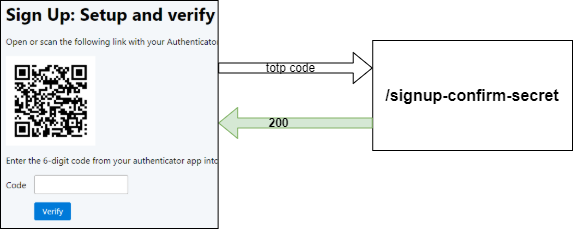
After creating a new entry in their authenticator app, the user enters the current TOTP code into the field. Then, the client sends this code to the /signup-confirm-secret endpoint. If the browser reloads the QR-code page first, /signup-pending restores the username and secret associated with the session.
  @GetMapping("/signup-pending")
  public ResponseEntity<SignupResponse> pendingSignup(HttpSession httpSession) {
    PendingSignup pending = getPendingSignup(httpSession);
    if (pending != null) {
      var record = this.dsl.select(APP_USER.USERNAME, APP_USER.SECRET, APP_USER.ENABLED)
        .from(APP_USER)
        .where(APP_USER.ID.eq(pending.appUserId())
          .and(ENROLLMENT_PENDING.isTrue())
          .and(ENROLLMENT_EXPIRES_AT.eq(pending.expiresAt()))
          .and(ENROLLMENT_EXPIRES_AT.gt(System.currentTimeMillis())))
        .fetchOne();
      if (record != null && Boolean.FALSE.equals(record.get(APP_USER.ENABLED))
          && isNotBlank(record.get(APP_USER.SECRET))) {
        return ResponseEntity.ok(new SignupResponse(SignupResponse.Status.OK, record.get(APP_USER.USERNAME),
            record.get(APP_USER.SECRET)));
      }
    }

    httpSession.removeAttribute(SessionKeys.PENDING_SIGNUP_USER_ID);
    return ResponseEntity.noContent().build();
  }
The confirmation handler reads the pending user ID from the session, loads only that disabled user, and validates a six-digit code within one 30-second interval on either side of the server clock. A successful conditional update sets enabled=true, records the matched interval to prevent its immediate reuse, clears the pending session state, and responds with true.
  @PostMapping("/signup-confirm-secret")
  public boolean signupConfirmSecret(@RequestParam("code") @Pattern(regexp = "\\d{6}") String code,
      HttpSession httpSession) {

    PendingSignup pending = getPendingSignup(httpSession);
    if (pending == null) {
      return false;
    }
    this.attemptLimiter.check("enrollment:" + pending.appUserId(), 5);
    var record = this.dsl.select(APP_USER.ID, APP_USER.SECRET)
      .from(APP_USER)
      .where(APP_USER.ID.eq(pending.appUserId())
        .and(APP_USER.ENABLED.isFalse())
        .and(ENROLLMENT_PENDING.isTrue())
        .and(ENROLLMENT_EXPIRES_AT.eq(pending.expiresAt()))
        .and(ENROLLMENT_EXPIRES_AT.gt(System.currentTimeMillis())))
      .fetchOne();
    if (record != null) {
      String secret = record.get(APP_USER.SECRET);
      CustomTotp.Result result = isNotBlank(secret) ? new CustomTotp(secret).verify(code, 1, 1) : null;
      if (result != null && result.isValid()) {
        int updated = this.dsl.update(APP_USER)
          .set(APP_USER.ENABLED, true)
          .set(ENROLLMENT_PENDING, false)
          .setNull(ENROLLMENT_EXPIRES_AT)
          .set(APP_USER.LAST_TOTP_INTERVAL, result.getMatchedInterval())
          .where(APP_USER.ID.eq(record.get(APP_USER.ID))
            .and(APP_USER.ENABLED.isFalse())
            .and(ENROLLMENT_PENDING.isTrue())
            .and(ENROLLMENT_EXPIRES_AT.eq(pending.expiresAt()))
            .and(ENROLLMENT_EXPIRES_AT.gt(System.currentTimeMillis())))
          .execute();
        if (updated == 1) {
          httpSession.removeAttribute(SessionKeys.PENDING_SIGNUP_USER_ID);
          return true;
        }
      }
    }
    else {
      httpSession.removeAttribute(SessionKeys.PENDING_SIGNUP_USER_ID);
    }

    return false;
  }
Sign In 
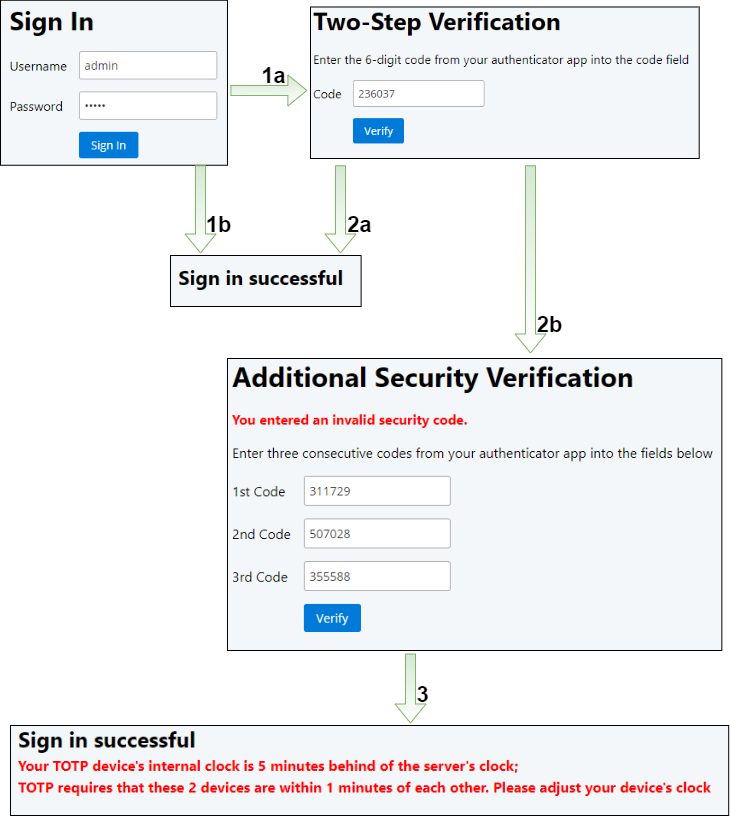
The sign-in workflow consists of three pages and the home page, which is only displayed when the login is successful. The user enters their username and password on the first page, and the application sends them to the back end.
If the username and password are correct, the application redirects the user to a second dialog where they have to enter their current TOTP code (1a). Users without 2FA are redirected directly to the home page (1b).
The application displays the home screen if the TOTP code is correct (2a). However, suppose the user enters an incorrect code. In that case, the application sets the user into the "additional verification" mode by setting the database field additional_security to true, and displaying a mask where the user has to enter three consecutive TOTP codes (2b).
The additional verification step increases the information an attacker must supply, but it does not replace server-side rate limiting. For example, imagine an attacker knows the username and password. The TOTP code is only a six-digit number, so there are only 1 million possible codes. The code changes every 30 seconds. This demo application accepts the current interval plus one interval in the past and future, so at most three time-step codes are valid during ordinary verification.
Without rate limiting, repeated guesses can eventually succeed. The current sample shares a five-attempt, five-minute per-user limit across both TOTP endpoints through LoginAttemptLimiter. Its counters are in memory; use a shared limiter when running multiple application instances so switching nodes or restarting does not reset the effective limit.
A legitimate user can also enter the "additional verification" mode, either by mistyping the TOTP code, or when the system clock on their device is not in sync with the clock on the server. Ordinary verification tolerates a difference of one 30-second interval in either direction.
After the user enters the three consecutive codes, the server validates them. This demo's clock-recovery flow requires all three codes to fall within five minutes of the server clock. Prefer fixing the device clock and keep rate limits and pending-authentication expiry active during recovery. If the codes are correct and consecutive, the application resets the database's flag and lets the user into the application.
0. Application Start 
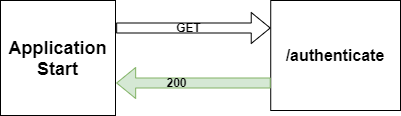
When the application starts, it sends a GET request to the /authenticate endpoint. This endpoint checks whether the user is fully authenticated or has a pending TOTP step in the HTTP session. Depending on the response, the web client restores the correct step after a page reload instead of always returning to the username/password dialog.
The application fetches the authentication object from the security context to check if a user is logged in. This object is of type AppUserAuthentication, and the application inserts the object into the security context after a successful sign-in attempt.
  @GetMapping("/authenticate")
  public AuthenticationFlow authenticate(HttpServletRequest request, CsrfToken csrfToken) {
    csrfToken.getToken();
    Authentication auth = SecurityContextHolder.getContext().getAuthentication();
    if (auth instanceof AppUserAuthentication) {
      return AuthenticationFlow.AUTHENTICATED;
    }

    HttpSession httpSession = request.getSession(false);
    if (httpSession != null) {
      AppUserRecord pendingUser = getPendingUser(httpSession);
      if (pendingUser != null) {
        return Boolean.TRUE.equals(pendingUser.getAdditionalSecurity())
            ? AuthenticationFlow.TOTP_ADDITIONAL_SECURITY : AuthenticationFlow.TOTP;
      }
    }

    return AuthenticationFlow.NOT_AUTHENTICATED;
  }
1. Username + Password 
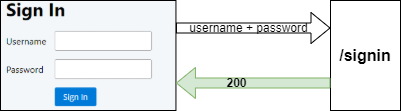
The /signin endpoint validates the username and password lengths, trims the username, and fetches the user record with a case-insensitive lookup. Authentication continues only if that account is enabled.
  @PostMapping("/signin")
  public AuthenticationFlow login(@RequestParam @NotBlank @Size(max = 255) String username,
      @RequestParam @NotBlank @Size(max = 256) String password, HttpSession httpSession,
      HttpServletRequest request, HttpServletResponse response) {

    httpSession.removeAttribute(SessionKeys.PENDING_AUTHENTICATION);
    httpSession.removeAttribute(SessionKeys.TOTP_SHIFT);
    SecurityContext emptyContext = SecurityContextHolder.createEmptyContext();
    SecurityContextHolder.setContext(emptyContext);
    this.securityContextRepository.saveContext(emptyContext, request, response);
    String normalizedUsername = username.trim().toLowerCase(Locale.ROOT);
    this.attemptLimiter.check("signin-ip:" + request.getRemoteAddr(), 30);
    this.attemptLimiter.check("password:" + normalizedUsername, 10);
    AppUserRecord appUserRecord = this.dsl.selectFrom(APP_USER)
      .where(APP_USER.USERNAME.equalIgnoreCase(normalizedUsername))
      .fetchAny();
If the user exists, the handler checks if the given password matches the password in the database.
      String passwordHash = appUserRecord.getPasswordHash();
      boolean pwMatches = passwordHash != null && this.passwordEncoder.matches(password, passwordHash);
If the password matches, the handler rotates the HTTP session ID to prevent session fixation. For a user with TOTP, it stores a PendingAuthentication record with the user ID, a credentials fingerprint, and a five-minute expiry. It creates the fully authenticated AppUserAuthentication only after TOTP succeeds. The response is "TOTP_ADDITIONAL_SECURITY" when the database flag is set and "TOTP" otherwise.
If the user does not have 2FA enabled, the code puts the authentication object into the security context and sends back the string "AUTHENTICATED". Spring Security handles the authentication object from here on. It stores it in the HTTP session, creating a session cookie.
      if (pwMatches && Boolean.TRUE.equals(appUserRecord.getEnabled())) {
        request.changeSessionId();
        httpSession.removeAttribute(SessionKeys.PENDING_SIGNUP_USER_ID);

        AppUserDetail detail = new AppUserDetail(appUserRecord);
        AppUserAuthentication userAuthentication = new AppUserAuthentication(detail);
        if (isNotBlank(appUserRecord.getSecret())) {
          httpSession.setAttribute(SessionKeys.PENDING_AUTHENTICATION,
              new PendingAuthentication(appUserRecord.getId(), credentialsFingerprint(appUserRecord),
                  this.clock.millis() + Duration.ofMinutes(5).toMillis()));

          if (isUserInAdditionalSecurityMode(detail.getAppUserId())) {
            return AuthenticationFlow.TOTP_ADDITIONAL_SECURITY;
          }

          return AuthenticationFlow.TOTP;
        }

        authenticate(userAuthentication, request, response);
        return AuthenticationFlow.AUTHENTICATED;
      }
If the user does not exist, the handler compares the submitted password with a precomputed dummy hash. This reduces the timing difference between an unknown username and a wrong password. The handler returns "NOT_AUTHENTICATED" in the response body.
    else {
      this.passwordEncoder.matches(password, this.userNotFoundEncodedPassword);
    }

    return AuthenticationFlow.NOT_AUTHENTICATED;
2. TOTP code 
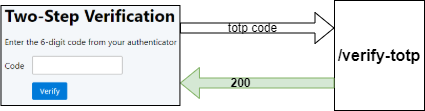
The /verify-totp endpoint accepts exactly six digits and checks whether a pending PendingAuthentication is stored in the HTTP session. It verifies its expiry, reloads the enabled user, and rejects pending state if the password or TOTP secret has changed. If there is no valid pending authentication, the method returns NOT_AUTHENTICATED; the caller has not completed the username/password step.
  @PostMapping("/verify-totp")
  public AuthenticationFlow totp(@RequestParam @Pattern(regexp = "\\d{6}") String code, HttpSession httpSession,
      HttpServletRequest request, HttpServletResponse response) {
    AppUserRecord user = getPendingUser(httpSession);
    if (user == null) {
      return AuthenticationFlow.NOT_AUTHENTICATED;
    }
Next, the handler must check if the user is in "additional verification" mode. As explained before, this is to thwart brute force attacks. If the user is in this mode, the method returns the string "TOTP_ADDITIONAL_SECURITY".
    if (Boolean.TRUE.equals(user.getAdditionalSecurity())) {
      return AuthenticationFlow.TOTP_ADDITIONAL_SECURITY;
    }
If the user is not in "additional verification" mode, the handler verifies the code with the secret stored in the database. For a valid code, a conditional database update records the matched time interval. If that interval is equal to or older than the last accepted interval, the conditional update rejects it, preventing reuse even across concurrent requests. Otherwise, the handler clears the pending state, saves the authentication in Spring Security's context, and returns "AUTHENTICATED". An invalid code sets additional_security=true and returns "TOTP_ADDITIONAL_SECURITY".
    String secret = user.getSecret();
    if (isNotBlank(secret)) {
      CustomTotp totp = new CustomTotp(secret, () -> this.clock.millis() / 30_000);
      CustomTotp.Result result = totp.verify(code, 1, 1);
      if (result.isValid()) {
        if (consumeTotpInterval(user, result.getMatchedInterval(), result.getMatchedInterval())) {
          httpSession.removeAttribute(SessionKeys.PENDING_AUTHENTICATION);
          authenticate(new AppUserAuthentication(new AppUserDetail(user)), request, response);
          return AuthenticationFlow.AUTHENTICATED;
        }
        return AuthenticationFlow.TOTP;
      }

      setAdditionalSecurityFlag(user.getId());
      return AuthenticationFlow.TOTP_ADDITIONAL_SECURITY;
    }

    return AuthenticationFlow.NOT_AUTHENTICATED;
With the second and third arguments of the verify() method, you can configure how many 30-second intervals the method checks into the past and future. Ordinary sign-in checks one interval in either direction.
3. Additional Security Verification 
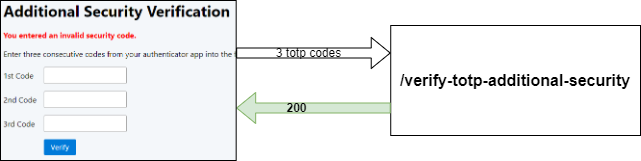
The /verify-totp-additional-security endpoint receives three six-digit TOTP codes, rejects duplicates, and checks for a valid pending authentication in the HTTP session. If it is absent, the user did not complete the username/password step and the method returns "NOT_AUTHENTICATED".
  @PostMapping("/verify-totp-additional-security")
  public AuthenticationFlow verifyTotpAdditionalSecurity(@RequestParam @Pattern(regexp = "\\d{6}") String code1,
      @RequestParam @Pattern(regexp = "\\d{6}") String code2,
      @RequestParam @Pattern(regexp = "\\d{6}") String code3, HttpSession httpSession, HttpServletRequest request,
      HttpServletResponse response) {

    AppUserRecord user = getPendingUser(httpSession);
    if (user == null) {
      return AuthenticationFlow.NOT_AUTHENTICATED;
    }
    this.attemptLimiter.check("totp:" + user.getId(), 5);
    if (!Boolean.TRUE.equals(user.getAdditionalSecurity())) {
      return AuthenticationFlow.TOTP;
    }
Next, the handler must check if the three codes are valid and consecutive. It does that with the help of the verify() method of the CustomTotp class. This method expects the codes in a List as the first argument. The 2nd and 3rd arguments define the number of 30-second intervals to search before and after the current interval for the first code. This example searches 10 intervals into the past and 8 into the future, leaving room for the next two codes so the entire sequence stays within five minutes of the server clock.
    String secret = user.getSecret();
    if (isNotBlank(secret)) {
      CustomTotp totp = new CustomTotp(secret, () -> this.clock.millis() / 30_000);

      // The entire sequence must fit within five minutes of the server clock.
      CustomTotp.Result result = totp.verify(List.of(code1, code2, code3), 10, 8);
      if (result.isValid()) {
        long lastCodeInterval = result.getMatchedInterval() + 2;
        if (!consumeTotpInterval(user, result.getMatchedInterval(), lastCodeInterval)) {
          return AuthenticationFlow.TOTP_ADDITIONAL_SECURITY;
        }
        if (result.getShift() > 2 || result.getShift() < -2) {
          httpSession.setAttribute(SessionKeys.TOTP_SHIFT, result.getShift());
        }

        httpSession.removeAttribute(SessionKeys.PENDING_AUTHENTICATION);

        authenticate(new AppUserAuthentication(new AppUserDetail(user)), request, response);
        return AuthenticationFlow.AUTHENTICATED;
      }
    }

    return AuthenticationFlow.TOTP_ADDITIONAL_SECURITY;
The verify() result reports whether the codes are valid, the time shift of the first code, and its matched interval. Valid means the method found all three codes consecutively in the configured time range. If the shift is outside the acceptable range of -2 to 2 intervals, the handler stores it in the session attribute "totp-shift".
If the three codes are valid, the handler records the interval of the last code to prevent its immediate reuse, resets additional_security, clears the pending state, saves the AppUserAuthentication in the security context, and returns "AUTHENTICATED".
If the three codes are invalid, the handler keeps the additional verification step pending and returns "TOTP_ADDITIONAL_SECURITY". An expired or invalid pending login instead returns "NOT_AUTHENTICATED".
4. TOTP time shift 
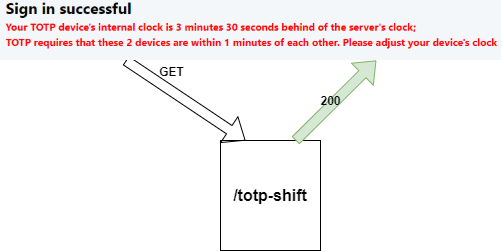
When the user enters the correct three codes, the application logs the user in and displays a message about how big the time difference is between the client and the server clock. To get this information, the client sends a GET request to the /totp-shift endpoint.
This handler checks the session attribute "totp-shift" that the application set in the previous step. If it exists, the handler removes it, creates a human-readable string, and sends that string to the client. The value is therefore displayed only once. The handler returns null when there is no recorded shift.
Wrapping Up 
You've reached the end of this tutorial about setting up a Spring Security authentication system with username/password and TOTP as a second factor. If you find a bug or security issue, open an issue on GitHub. If you have other questions, send me a message.