Many business applications need an audit trail. You often have to answer questions such as when data changed, who changed it, and which fields were affected.
Hibernate Envers solves this problem by adding revision tracking to Hibernate ORM entities. In a Jakarta Persistence application, you annotate the entities or properties you want to audit, and Envers writes the history into dedicated audit tables. It also provides an API for reading historical revisions back.
This article uses Hibernate ORM 7.4, Hibernate Envers 7.4, and a small H2-backed sample project.
Setup 
Start by adding Envers to your project. In Maven, the important dependency is hibernate-envers, which now lives under the org.hibernate.orm group.
    <dependency>
      <groupId>org.hibernate.orm</groupId>
      <artifactId>hibernate-core</artifactId>
      <version>${hibernate.version}</version>
    </dependency>
    <dependency>
      <groupId>org.hibernate.orm</groupId>
      <artifactId>hibernate-envers</artifactId>
      <version>${hibernate.version}</version>
    </dependency>
Next, annotate the entity classes or properties you want to audit with @Audited.
In the sample project, the Employee class is audited at the class level, so Envers tracks every mapped property.
@Entity
@Audited(withModifiedFlag = true)
public class Employee {
  @Id
  @GeneratedValue(strategy = GenerationType.IDENTITY)
  private int id;

  private String lastName;

  private String firstName;

  private String street;

  private String city;

  @ManyToOne
  private Company company;
In the Company class, only the name property is audited. The other properties are ignored.
@Entity
public class Company {
  @Id
  @GeneratedValue(strategy = GenerationType.IDENTITY)
  private int id;

  @Audited
  private String name;

  private String street;

  private String city;

  @OneToMany(mappedBy = "company", cascade = CascadeType.ALL, orphanRemoval = true)
  private Set<Employee> employees;
If you audit a whole class and want to exclude individual fields, Envers also provides @NotAudited.
Use immutable primary keys for audited entities. Envers uses the entity identifier together with the revision number as the key in the audit tables, so changing a primary key breaks the audit history model.
Tables 
The sample project uses a Jakarta Persistence 3.2 persistence.xml descriptor and sets hibernate.hbm2ddl.auto to update.
    <properties>
      <property name="jakarta.persistence.jdbc.driver" value="org.h2.Driver" />
      <property name="jakarta.persistence.jdbc.url" value="jdbc:h2:./db/test" />
      <property name="jakarta.persistence.jdbc.user" value="sa" />
      <property name="jakarta.persistence.jdbc.password" value="" />
      <property name="hibernate.show_sql" value="true" />
      <property name="hibernate.hbm2ddl.auto" value="update" />
    </properties>
With this configuration, Hibernate creates the Employee and Company tables. For every audited entity, Envers creates an additional audit table with the _AUD suffix. It also creates the REVINFO table, which stores the global revision number and the timestamp of each revision.
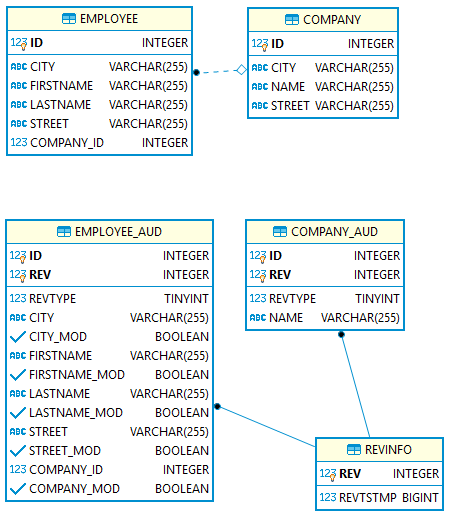
Whenever you insert, update, or delete an audited entity, Envers creates a new revision and writes rows into REVINFO and the corresponding audit table.
The EMPLOYEE_AUD table contains audit columns for every mapped field in EMPLOYEE, while COMPANY_AUD only contains the name column because that is the only audited property in Company.
In Employee, the class-level annotation enables withModifiedFlag. Envers therefore adds an additional _MOD column for each audited property. These boolean columns tell you whether a property changed in a specific revision.
Company does not enable this option, so COMPANY_AUD has no NAME_MOD column.
For comparison, here is the EMPLOYEE_AUD table definition without modified flags:
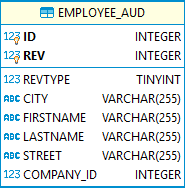
Only enable withModifiedFlag when you actually need property-level change information. The extra columns increase the size of the audit tables. They are required if you want to use forRevisionsOfEntityWithChanges().
Custom Revision Entity 
By default, Envers stores only the revision number and timestamp. In a multi-user application, that is usually not enough. You often also want to know who made the change.
To do that, create a custom revision entity annotated with @Entity and @RevisionEntity. Any extra fields you add are stored in REVINFO together with the revision number and timestamp.
@Entity
@Table(name = "REVINFO")
@RevisionEntity(CustomRevisionEntityListener.class)
public class CustomRevisionEntity {

  @Id
  @GeneratedValue
  @RevisionNumber
  private int id;

  @RevisionTimestamp
  private long timestamp;

  private String username;
The listener referenced by @RevisionEntity must implement RevisionListener. In newRevision, fill the custom fields for the current revision. Envers takes care of the revision number and timestamp.
public class CustomRevisionEntityListener implements RevisionListener {

  @Override
  public void newRevision(Object revisionEntity) {
    CustomRevisionEntity customRevisionEntity = (CustomRevisionEntity) revisionEntity;
    customRevisionEntity.setUsername(CurrentUser.INSTANCE.get());
  }
}
CustomRevisionEntityListener.java
In this demo, the current user name is stored in a ThreadLocal. The revision listener reads it with CurrentUser.INSTANCE.get(), and the example code sets it with CurrentUser.INSTANCE.logIn(...).
public class CurrentUser {

  public static final CurrentUser INSTANCE = new CurrentUser();

  private static final ThreadLocal<String> storage = new ThreadLocal<>();

  public void logIn(String user) {
    storage.set(user);
  }

  public void logOut() {
    storage.remove();
  }

  public String get() {
    return storage.get();
  }
}
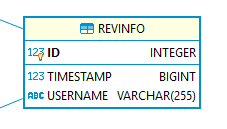
With this setup, REVINFO gets an additional username column.
The official guide covers more advanced revision metadata options here: https://docs.hibernate.org/orm/7.4/userguide/html_single/Hibernate_User_Guide.html#envers-revisionlog
Examples 
The sample application inserts, updates, and deletes a few entities so we can see how Envers records each change.
Before the example data is inserted, the demo resets the local H2 database with DROP ALL OBJECTS. That keeps the sample reproducible: each run starts again with revision 1, and MainQuery can still inspect the data generated by the last Main run.
  public static void resetDemoDatabase() {
    shutdown();

    try (Connection connection = DriverManager.getConnection(JDBC_URL, JDBC_USER,
        JDBC_PASSWORD);
        var statement = connection.createStatement()) {
      statement.execute("DROP ALL OBJECTS");
    }
    catch (SQLException e) {
      throw new IllegalStateException("Unable to reset the demo database", e);
    }
  }
Revision 1: Insert 
First, user Alice inserts one company and two employees.
    JPAUtil.resetDemoDatabase();

    // Revision 1
    System.out.println("Revision 1: INSERT");

    EntityManager em = JPAUtil.getEntityManagerFactory().createEntityManager();
    CurrentUser.INSTANCE.logIn("Alice");

    em.getTransaction().begin();
    Company company = new Company();
    company.setName("E Corp");
    company.setCity("New York City");
    company.setStreet(null);

    Set<Employee> employees = new HashSet<>();

    Employee employee = new Employee();
    employee.setCompany(company);
    employee.setLastName("Spencer");
    employee.setFirstName("Linda");
    employee.setStreet("High Street 123");
    employee.setCity("Newark");
    employees.add(employee);

    employee = new Employee();
    employee.setCompany(company);
    employee.setLastName("Ralbern");
    employee.setFirstName("Michael");
    employee.setStreet("57th Street");
    employee.setCity("New York City");
    employees.add(employee);

    company.setEmployees(employees);

    em.persist(company);
    em.getTransaction().commit();
There is no Envers-specific write API here. You use normal Jakarta Persistence or Hibernate code, and Envers hooks into the persistence lifecycle.
Because all three inserts happen in one transaction, Envers creates one revision in REVINFO, one row in COMPANY_AUD, and two rows in EMPLOYEE_AUD. For inserts, all _MOD columns are TRUE because all audited properties are new.
The exact timestamp values depend on when you run the sample.
REVINFO
+----+---------------+----------+
| ID |   TIMESTAMP   | USERNAME |
+----+---------------+----------+
|  1 | 1564997410711 | Alice    |
+----+---------------+----------+

COMPANY_AUD
+----+-----+---------+--------+
| ID | REV | REVTYPE |  NAME  |
+----+-----+---------+--------+
|  1 |   1 |       0 | E Corp |
+----+-----+---------+--------+

EMPLOYEE_AUD
+----+-----+---------+----------------+----------+-----------+---------------+----------+--------------+------------------+------------+------------+-------------+
| ID | REV | REVTYPE |      CITY      | CITY_MOD | FIRSTNAME | FIRSTNAME_MOD | LASTNAME | LASTNAME_MOD |      STREET      | STREET_MOD | COMPANY_ID | COMPANY_MOD |
+----+-----+---------+----------------+----------+-----------+---------------+----------+--------------+------------------+------------+------------+-------------+
|  1 |   1 |       0 | New York City  |     TRUE | Michael   |          TRUE | Ralbern  |         TRUE | 57th Street      |       TRUE |          1 |        TRUE |
+----+-----+---------+----------------+----------+-----------+---------------+----------+--------------+------------------+------------+------------+-------------+
|  2 |   1 |       0 | Newark         |     TRUE | Linda     |          TRUE | Spencer  |         TRUE | High Street 123  |       TRUE |          1 |        TRUE |
+----+-----+---------+----------------+----------+-----------+---------------+----------+--------------+------------------+------------+------------+-------------+
Revision 2: Update Company 
In the next transaction, Bob changes the company name from E Corp to EEE Corp.
    CriteriaBuilder cb = em.getCriteriaBuilder();
    CriteriaQuery<Company> q = cb.createQuery(Company.class);
    Root<Company> c = q.from(Company.class);
    ParameterExpression<String> p = cb.parameter(String.class);
    q.select(c).where(cb.equal(c.get("name"), p));

    TypedQuery<Company> query1 = em.createQuery(q);
    query1.setParameter(p, "E Corp");

    company = query1.getSingleResult();
    company.setName("EEE Corp");

    em.getTransaction().commit();
Envers creates a new revision and inserts a new row into COMPANY_AUD. REVTYPE = 1 denotes an update.
REVINFO
+----+---------------+----------+
| ID |   TIMESTAMP   | USERNAME |
+----+---------------+----------+
|  1 | 1564997410711 | Alice    |
+----+---------------+----------+
|  2 | 1564997410849 | Bob      |
+----+---------------+----------+

COMPANY_AUD
+----+-----+---------+----------+
| ID | REV | REVTYPE |   NAME   |
+----+-----+---------+----------+
|  1 |   1 |       0 | E Corp   |
+----+-----+---------+----------+
|  1 |   2 |       1 | EEE Corp |
+----+-----+---------+----------+
Revision 3: Insert Employee 
Bob inserts a new employee, Janet Robinson.
    employee = new Employee();
    employee.setCompany(company);
    employee.setLastName("Robinson");
    employee.setFirstName("Janet");
    employee.setCity("Greenwich");
    employee.setStreet("Walsh Ln 10");
    company.getEmployees().add(employee);
    em.getTransaction().commit();
REVINFO
+----+---------------+----------+
| ID |   TIMESTAMP   | USERNAME |
+----+---------------+----------+
|  1 | 1564997410711 | Alice    |
+----+---------------+----------+
|  2 | 1564997410849 | Bob      |
+----+---------------+----------+
|  3 | 1564997410858 | Bob      |
+----+---------------+----------+

EMPLOYEE_AUD
+----+-----+---------+----------------+----------+-----------+---------------+----------+--------------+------------------+------------+------------+-------------+
| ID | REV | REVTYPE |      CITY      | CITY_MOD | FIRSTNAME | FIRSTNAME_MOD | LASTNAME | LASTNAME_MOD |      STREET      | STREET_MOD | COMPANY_ID | COMPANY_MOD |
+----+-----+---------+----------------+----------+-----------+---------------+----------+--------------+------------------+------------+------------+-------------+
|  1 |   1 |       0 | New York City  |     TRUE | Michael   |          TRUE | Ralbern  |         TRUE | 57th Street      |       TRUE |          1 |        TRUE |
+----+-----+---------+----------------+----------+-----------+---------------+----------+--------------+------------------+------------+------------+-------------+
|  2 |   1 |       0 | Newark         |     TRUE | Linda     |          TRUE | Spencer  |         TRUE | High Street 123  |       TRUE |          1 |        TRUE |
+----+-----+---------+----------------+----------+-----------+---------------+----------+--------------+------------------+------------+------------+-------------+
|  3 |   3 |       0 | Greenwich      |     TRUE | Janet     |          TRUE | Robinson |         TRUE | Walsh Ln 10      |       TRUE |          1 |        TRUE |
+----+-----+---------+----------------+----------+-----------+---------------+----------+--------------+------------------+------------+------------+-------------+
Revision 4: Update Employee 
Alice updates the street and city of Linda Spencer.
    TypedQuery<Employee> query2 = createEmployeeQuery(em, "Linda", "Spencer");
    employee = query2.getSingleResult();
    employee.setStreet("101 W 91st St");
    employee.setCity("New York City");
    em.getTransaction().commit();
Only CITY_MOD and STREET_MOD are TRUE in this revision because those are the only audited properties that changed.
EMPLOYEE_AUD
+----+-----+---------+----------------+----------+-----------+---------------+----------+--------------+------------------+------------+------------+-------------+
| ID | REV | REVTYPE |      CITY      | CITY_MOD | FIRSTNAME | FIRSTNAME_MOD | LASTNAME | LASTNAME_MOD |      STREET      | STREET_MOD | COMPANY_ID | COMPANY_MOD |
+----+-----+---------+----------------+----------+-----------+---------------+----------+--------------+------------------+------------+------------+-------------+
|  1 |   1 |       0 | New York City  |     TRUE | Michael   |          TRUE | Ralbern  |         TRUE | 57th Street      |       TRUE |          1 |        TRUE |
+----+-----+---------+----------------+----------+-----------+---------------+----------+--------------+------------------+------------+------------+-------------+
|  2 |   1 |       0 | Newark         |     TRUE | Linda     |          TRUE | Spencer  |         TRUE | High Street 123  |       TRUE |          1 |        TRUE |
+----+-----+---------+----------------+----------+-----------+---------------+----------+--------------+------------------+------------+------------+-------------+
|  3 |   3 |       0 | Greenwich      |     TRUE | Janet     |          TRUE | Robinson |         TRUE | Walsh Ln 10      |       TRUE |          1 |        TRUE |
+----+-----+---------+----------------+----------+-----------+---------------+----------+--------------+------------------+------------+------------+-------------+
|  2 |   4 |       1 | New York City  |     TRUE | Linda     |         FALSE | Spencer  |        FALSE | 101 W 91st St    |       TRUE |          1 |       FALSE |
+----+-----+---------+----------------+----------+-----------+---------------+----------+--------------+------------------+------------+------------+-------------+
Revision 5: Delete Employee 
Alice deletes Michael Ralbern.
    TypedQuery<Employee> query3 = createEmployeeQuery(em, "Michael", "Ralbern");
    employee = query3.getSingleResult();
    employee.getCompany().getEmployees().remove(employee);
    em.remove(employee);
    em.getTransaction().commit();
REVTYPE = 2 denotes a delete. For delete revisions, the audited properties are stored as NULL.
EMPLOYEE_AUD
+----+-----+---------+----------------+----------+-----------+---------------+----------+--------------+------------------+------------+------------+-------------+
| ID | REV | REVTYPE |      CITY      | CITY_MOD | FIRSTNAME | FIRSTNAME_MOD | LASTNAME | LASTNAME_MOD |      STREET      | STREET_MOD | COMPANY_ID | COMPANY_MOD |
+----+-----+---------+----------------+----------+-----------+---------------+----------+--------------+------------------+------------+------------+-------------+
|  1 |   1 |       0 | New York City  |     TRUE | Michael   |          TRUE | Ralbern  |         TRUE | 57th Street      |       TRUE |          1 |        TRUE |
+----+-----+---------+----------------+----------+-----------+---------------+----------+--------------+------------------+------------+------------+-------------+
|  2 |   1 |       0 | Newark         |     TRUE | Linda     |          TRUE | Spencer  |         TRUE | High Street 123  |       TRUE |          1 |        TRUE |
+----+-----+---------+----------------+----------+-----------+---------------+----------+--------------+------------------+------------+------------+-------------+
|  3 |   3 |       0 | Greenwich      |     TRUE | Janet     |          TRUE | Robinson |         TRUE | Walsh Ln 10      |       TRUE |          1 |        TRUE |
+----+-----+---------+----------------+----------+-----------+---------------+----------+--------------+------------------+------------+------------+-------------+
|  2 |   4 |       1 | New York City  |     TRUE | Linda     |         FALSE | Spencer  |        FALSE | 101 W 91st St    |       TRUE |          1 |       FALSE |
+----+-----+---------+----------------+----------+-----------+---------------+----------+--------------+------------------+------------+------------+-------------+
|  1 |   5 |       2 | NULL           |     TRUE | NULL      |          TRUE | NULL     |         TRUE | NULL             |       TRUE |       NULL |        TRUE |
+----+-----+---------+----------------+----------+-----------+---------------+----------+--------------+------------------+------------+------------+-------------+
Queries 
Writing the audit trail is only half of the story. You also need to read historical data back. Envers exposes that functionality through AuditReader.
Create an AuditReader with AuditReaderFactory.get(...) and an EntityManager.
    EntityManager em = JPAUtil.getEntityManagerFactory().createEntityManager();
    AuditReader reader = AuditReaderFactory.get(em);
getRevisions() returns the revision numbers at which a specific entity changed.
    System.out.println("getRevisions, getRevisionDate, findRevision, find");
    List<Number> revisions = reader.getRevisions(Company.class, 1);
    for (Number rev : revisions) {
getRevisionDate() returns the timestamp for a revision.
      System.out.println(rev);
      Date revisionDate = reader.getRevisionDate(rev);
      System.out.println(revisionDate);
To access the custom username column from REVINFO, call findRevision() with the custom revision entity type.
      CustomRevisionEntity revision = reader.findRevision(CustomRevisionEntity.class,
          rev);
      String username = revision.getUsername();
      System.out.println(username);
find() loads an entity as it looked in a given revision.
      Company comp = reader.find(Company.class, 1, rev);
      String name = comp.getName();
      String street = comp.getStreet();
      System.out.println(name);
      System.out.println(street);
The program prints output like this. The date values reflect the current run:
1
Mon Aug 05 07:46:25 CEST 2019
Alice
E Corp
null
------------------------------------------------
2
Mon Aug 05 07:46:25 CEST 2019
Bob
EEE Corp
null
The company changed in revision 1 when it was inserted and in revision 2 when its name was updated. street is null in the historical Company instance because only name is audited.
You can also ask for the state of an entity at a revision where that entity itself was not changed. In revision 5, an employee was deleted, but the company snapshot is still available.
    System.out.println("===========================================");
    System.out.println("find revision 5");
    Company comp = reader.find(Company.class, 1, 5);
    String name = comp.getName();
    System.out.println(name); // output: EEE Corp
For time-based lookups, Envers also provides find(...) and getRevisionNumberForDate(...) overloads that accept modern Java time types such as Instant and LocalDateTime.
The sample uses getRevisionNumberForDate() with Instant.now().
    System.out.println("===========================================");
    System.out.println("getRevisionNumberForDate");
    Number revNumber = reader.getRevisionNumberForDate(Instant.now());
    System.out.println(revNumber); // output: 5
AuditQuery 
More advanced queries are built with AuditQuery through AuditReader.createQuery().
forEntitiesAtRevision() returns all entities of a type as they existed in a specific revision.
    System.out.println("forEntitiesAtRevision");
    AuditQuery query = reader.createQuery().forEntitiesAtRevision(Employee.class, 1);
    query.add(AuditEntity.relatedId("company").eq(1));
    for (Employee e : (List<Employee>) query.getResultList()) {
      System.out.println(e.getId() + ": " + e.getLastName() + " " + e.getFirstName());
    }
    // 1: Ralbern Michael
    // 2: Spencer Linda
You can add restrictions with query.add(...). In the example above, we only return employees that belong to company 1.
If you run the same query for revision 2, you still get the two original employees even though revision 2 only changed the company. forEntitiesAtRevision() returns the entity state at that revision, not only the entities modified in that revision.
    query = reader.createQuery().forEntitiesAtRevision(Employee.class, 2);
    query.add(AuditEntity.relatedId("company").eq(1));
    for (Employee e : (List<Employee>) query.getResultList()) {
      System.out.println(e.getId() + ": " + e.getLastName() + " " + e.getFirstName());
    }
    // 1: Ralbern Michael
    // 2: Spencer Linda
In revision 5, the result changes because one employee was inserted in revision 3 and another was deleted in revision 5.
    query = reader.createQuery().forEntitiesAtRevision(Employee.class, 5);
    query.add(AuditEntity.relatedId("company").eq(1));
    for (Employee e : (List<Employee>) query.getResultList()) {
      System.out.println(e.getId() + ": " + e.getLastName() + " " + e.getFirstName());
    }
    // 3: Robinson Janet
    // 2: Spencer Linda
Here is another restriction that only returns employees with the last name Spencer.
    query = reader.createQuery().forEntitiesAtRevision(Employee.class, 5);
    query.add(AuditEntity.property("lastName").eq("Spencer"));
    // query.add(AuditEntity.or(AuditEntity.property("lastName").eq("Spencer"),
    // AuditEntity.property("lastName").eq("Robinson")));
    for (Employee e : (List<Employee>) query.getResultList()) {
      System.out.println(e.getId() + ": " + e.getLastName() + " " + e.getFirstName());
    }
    // 2: Spencer Linda
You can combine predicates with AuditEntity.or() and AuditEntity.and().
query.add(AuditEntity.or(AuditEntity.property("lastName").eq("Spencer"), AuditEntity.property("lastName").eq("Robinson")));
By default, forEntitiesAtRevision() excludes deleted entities. To include them, use the overload that accepts the includeDeletions flag.
    query = reader.createQuery().forEntitiesAtRevision(Employee.class,
        Employee.class.getName(), 5, true);
    for (Employee e : (List<Employee>) query.getResultList()) {
      System.out.println(e.getId() + ": " + e.getLastName() + " " + e.getFirstName());
    }
    // 3: Robinson Janet
    // 2: Spencer Linda
    // 1: null null
Deleted entities are returned with their identifier, but the other audited properties are null.
forEntitiesModifiedAtRevision() behaves differently. It only returns entities that were actually modified in the selected revision.
In revision 1, the query returns two employees because both were inserted in that revision.
    query = reader.createQuery().forEntitiesModifiedAtRevision(Employee.class, 1);
    for (Employee e : (List<Employee>) query.getResultList()) {
      System.out.println(e.getId() + ": " + e.getLastName() + " " + e.getFirstName());
    }
    // 1: Ralbern Michael
    // 2: Spencer Linda
In revision 2, the result is empty because only the company changed.
    query = reader.createQuery().forEntitiesModifiedAtRevision(Employee.class, 2);
    for (Employee e : (List<Employee>) query.getResultList()) {
      System.out.println(e.getId() + ": " + e.getLastName() + " " + e.getFirstName());
    }
    // empty
In revision 5, the query returns just the deleted employee.
    query = reader.createQuery().forEntitiesModifiedAtRevision(Employee.class, 5);
    for (Employee e : (List<Employee>) query.getResultList()) {
      System.out.println(e.getId() + ": " + e.getLastName() + " " + e.getFirstName());
    }
    // 1: null null
forRevisionsOfEntity() returns the revisions at which an entity type changed. Unless you ask for entities only, each row is an array containing the entity instance, the revision entity, and the RevisionType.
    query = reader.createQuery().forRevisionsOfEntity(Employee.class, false, true);
    // query.add(AuditEntity.id().eq(1));
    List<Object[]> results = query.getResultList();
    for (Object[] result : results) {
      Employee employee = (Employee) result[0];
      CustomRevisionEntity revEntity = (CustomRevisionEntity) result[1];
      RevisionType revType = (RevisionType) result[2];

      System.out.println("Revision     : " + revEntity.getId());
      System.out.println("Revision Date: " + revEntity.getRevisionDate());
      System.out.println("User         : " + revEntity.getUsername());
      System.out.println("Type         : " + revType);
      System.out.println(
          "Employee     : " + employee.getLastName() + " " + employee.getFirstName());
The output below does not contain revision 2 because revision 2 changed Company, not Employee.
Revision : 1
Revision Date: Mon Aug 05 07:46:25 CEST 2019
User : Alice
Type : ADD
Employee : Ralbern Michael
------------------------------------------------
Revision : 1
Revision Date: Mon Aug 05 07:46:25 CEST 2019
User : Alice
Type : ADD
Employee : Spencer Linda
------------------------------------------------
Revision : 3
Revision Date: Mon Aug 05 07:46:25 CEST 2019
User : Bob
Type : ADD
Employee : Robinson Janet
------------------------------------------------
Revision : 4
Revision Date: Mon Aug 05 07:46:25 CEST 2019
User : Alice
Type : MOD
Employee : Spencer Linda
------------------------------------------------
Revision : 5
Revision Date: Mon Aug 05 07:46:25 CEST 2019
User : Alice
Type : DEL
Employee : null null
AuditEntity.revisionProperty(...) lets you filter revisions by properties stored in the revision entity. In the sample, this is used to select revisions created by Bob.
    query = reader.createQuery().forRevisionsOfEntity(Employee.class, false, true);
    query.add(AuditEntity.revisionProperty("username").eq("Bob"));
Bob only created one employee-related revision.
Revision : 3
Revision Date: Mon Aug 05 07:46:25 CEST 2019
User : Bob
Type : ADD
Employee : Robinson Janet
Finally, forRevisionsOfEntityWithChanges() returns the same core information as forRevisionsOfEntity(), plus a fourth element containing the set of changed property names.
You need @Audited(withModifiedFlag = true) if you want Envers to report changed property names.
    query = reader.createQuery().forRevisionsOfEntityWithChanges(Employee.class, true);
    results = query.getResultList();
    for (Object[] result : results) {
      Employee employee = (Employee) result[0];
      CustomRevisionEntity revEntity = (CustomRevisionEntity) result[1];
      RevisionType revType = (RevisionType) result[2];
      Set<String> properties = (Set<String>) result[3];

      System.out.println("Revision     : " + revEntity.getId());
      System.out.println("Revision Date: " + revEntity.getRevisionDate());
      System.out.println("User         : " + revEntity.getUsername());
      System.out.println("Type         : " + revType);
      System.out.println("Changed Props: " + properties);
      System.out.println(
          "Employee     : " + employee.getLastName() + " " + employee.getFirstName());
Only update revisions populate the changed-property set.
Revision : 1
Revision Date: Mon Aug 05 07:46:25 CEST 2019
User : Alice
Type : ADD
Changed Props: []
Employee : Ralbern Michael
------------------------------------------------
Revision : 1
Revision Date: Mon Aug 05 07:46:25 CEST 2019
User : Alice
Type : ADD
Changed Props: []
Employee : Spencer Linda
------------------------------------------------
Revision : 3
Revision Date: Mon Aug 05 07:46:25 CEST 2019
User : Bob
Type : ADD
Changed Props: []
Employee : Robinson Janet
------------------------------------------------
Revision : 4
Revision Date: Mon Aug 05 07:46:25 CEST 2019
User : Alice
Type : MOD
Changed Props: [city, street]
Employee : Spencer Linda
------------------------------------------------
Revision : 5
Revision Date: Mon Aug 05 07:46:25 CEST 2019
User : Alice
Type : DEL
Changed Props: []
Employee : null null
Hibernate Envers gives you a practical audit history with very little application code. If your application already uses Hibernate ORM, it is one of the simplest ways to add revision tracking and historical queries.
See the official documentation for more: https://docs.hibernate.org/orm/7.4/userguide/html_single/#envers
The sample project used in this article is available here: https://github.com/ralscha/blog2019/tree/master/envers