Rate limiting is a technique for controlling how quickly a client can send requests. It is common in HTTP APIs where a service needs to protect itself or an upstream dependency from bursts, abuse, or simple overuse.
For example, GitHub limits authenticated API traffic to 5,000 requests per hour and unauthenticated traffic to 60 requests per hour per IP address: https://docs.github.com/en/rest/using-the-rest-api/rate-limits-for-the-rest-api?apiVersion=2022-11-28
This post shows how to rate limit Spring MVC endpoints in a Spring Boot application with Bucket4j.
Algorithm 
You can implement rate limiting with several algorithms:
- Token bucket
- Leaky bucket
- Fixed window counter
- Sliding window log
- Sliding window counter
The examples in this post use the Bucket4j Java library, which implements the token bucket algorithm.
The basic idea is simple. You have a bucket with a maximum number of tokens, called the capacity. Each request consumes one or more tokens. A client can only proceed if the bucket contains enough tokens for that request. If not, the request must wait or be rejected.
Tokens must also be added back over time. That is the job of the refiller.
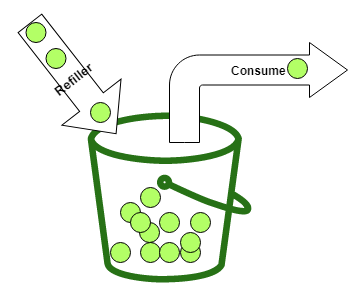
Bucket4j differentiates between two common refill styles:
Bandwidth limit = Bandwidth.builder().capacity(5).refillIntervally(5, Duration.ofMinutes(1)).build();
The intervally refiller waits until the configured period has elapsed and then adds all tokens at once. In this example, it adds five tokens every minute.
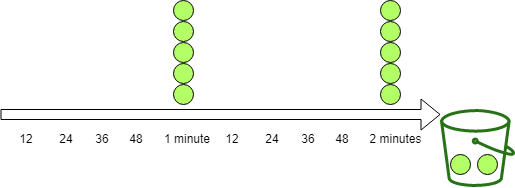
Bucket4j also provides IntervallyAligned, which lets you align the first refill to a specific boundary such as the next minute or the start of the next hour. See the reference documentation for details.
Bandwidth limit = Bandwidth.builder().capacity(5).refillGreedy(5, Duration.ofMinutes(1)).build();
The greedy refiller spreads replenishment across the interval. In this example, one minute is split into five slices, so the bucket receives one token every 12 seconds. After one minute, both refillers have added the same number of tokens.
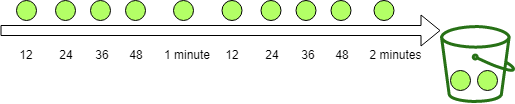
Buckets always respect their maximum capacity. Once the bucket is full, additional refill operations do not add more tokens.
For a deeper description of the token bucket algorithm, see Appendix A of RFC 3290.
Setup 
First add Bucket4j to the project. In this sample I use the current core module together with the dedicated Hazelcast integration module.
    <dependency>
      <groupId>com.bucket4j</groupId>
      <artifactId>bucket4j_jdk17-core</artifactId>
      <version>${bucket4j.version}</version>
    </dependency>
    <dependency>
      <groupId>com.bucket4j</groupId>
      <artifactId>bucket4j_jdk17-hazelcast</artifactId>
      <version>${bucket4j.version}</version>
    </dependency>
Bucket4j is not tied to Spring. You can use it in any JVM application.
Basic example 
The sample application exposes earthquake data from the last week. It downloads the latest data from usgs.gov and stores it in a PostgreSQL database with jOOQ.
The following endpoint returns information about the earthquake with the highest magnitude.
  @GetMapping("/top1")
  public ResponseEntity<Earthquake> getTop1() {
    if (this.bucket.tryConsume(1)) {
      Earthquake body = this.dsl.selectFrom(EARTHQUAKE).orderBy(EARTHQUAKE.MAG.desc())
          .limit(1).fetchOneInto(Earthquake.class);
      return ResponseEntity.ok().body(body);
    }

    return ResponseEntity.status(HttpStatus.TOO_MANY_REQUESTS).build();
  }
The bucket configuration lives in the controller constructor. It allows ten requests per minute and uses a greedy refiller, which means the bucket receives one token every six seconds.
  public EarthquakeController(DSLContext dsl) {
    this.dsl = dsl;

    long capacity = 10;
    Bandwidth limit = Bandwidth.builder().capacity(capacity)
        .refillGreedy(capacity, Duration.ofMinutes(1)).build();
    this.bucket = Bucket.builder().addLimit(limit).build();
  }
This bucket is global, so every client shares the same token pool. Later in the post, we will build per-client buckets.
By default, a new bandwidth starts full. In the example above, the bucket contains ten tokens right after construction. If you want a different starting point, configure initialTokens.
    long capacity = 10;
    Bandwidth limit = Bandwidth.builder()
        .capacity(capacity)
        .refillGreedy(capacity, Duration.ofMinutes(1))
        .initialTokens(1)
        .build();
This bucket starts with one token.
The simplest check is tryConsume(numTokens). It returns true when the bucket can consume the requested number of tokens and false otherwise. The token count can be greater than one, which is useful if one endpoint is more expensive than another.
  @GetMapping("/top1")
  public ResponseEntity<Earthquake> getTop1() {
    if (this.bucket.tryConsume(1)) {
      Earthquake body = this.dsl.selectFrom(EARTHQUAKE).orderBy(EARTHQUAKE.MAG.desc())
          .limit(1).fetchOneInto(Earthquake.class);
      return ResponseEntity.ok().body(body);
    }

    return ResponseEntity.status(HttpStatus.TOO_MANY_REQUESTS).build();
  }
For HTTP endpoints, the standard response is 429 Too Many Requests.
To test the endpoint, I use a small client built with the JDK HttpClient.
  private static void top1Client() {
    System.out.println("/top1");
    try {
      for (int i = 0; i < 11; i++) {
        Builder builder = HttpRequest.newBuilder().uri(URI.create(SERVER_1 + "/top1"))
            .GET();
        HttpRequest request = builder.build();
        HttpResponse<String> response = httpClient.send(request, BodyHandlers.ofString());
        System.out.println(response.statusCode());
      }
    }
    catch (IOException | InterruptedException e) {
      e.printStackTrace();
    }
  }
If the limit is configured correctly, the first ten calls return 200, and the eleventh returns 429.
Return additional rate limit information 
Most APIs return more than just 429. Clients benefit from knowing how much quota remains and when they can retry.
Bucket4j's verbose API is a good fit here. It gives you the normal ConsumptionProbe plus a snapshot of the current configuration and diagnostics.
The controller below uses asVerbose().tryConsumeAndReturnRemaining(1) and maps the result to standard HTTP headers:
RateLimit-Limit: the configured bucket capacityRateLimit-Remaining: the number of tokens left after the requestRateLimit-Reset: seconds until the bucket is fully refilledRetry-After: seconds until the client can retry successfully after a429
  @GetMapping("/top/{top}")
  public ResponseEntity<List<Earthquake>> getTopOrderByMag(@PathVariable("top") int top) {
    VerboseResult<ConsumptionProbe> verboseResult = this.bucket.asVerbose()
      .tryConsumeAndReturnRemaining(1);
    ConsumptionProbe probe = verboseResult.getValue();
    long limit = Arrays.stream(verboseResult.getConfiguration().getBandwidths())
      .mapToLong(Bandwidth::getCapacity).max().orElseThrow();
    long resetSeconds = nanosToSeconds(
      verboseResult.getDiagnostics().calculateFullRefillingTime());

    if (probe.isConsumed()) {
      List<Earthquake> body = this.dsl.selectFrom(EARTHQUAKE)
          .orderBy(EARTHQUAKE.MAG.desc()).limit(top).fetchInto(Earthquake.class);
      return ResponseEntity.ok()
        .header("RateLimit-Limit", Long.toString(limit))
        .header("RateLimit-Remaining",
          Long.toString(verboseResult.getDiagnostics().getAvailableTokens()))
        .header("RateLimit-Reset", Long.toString(resetSeconds))
          .body(body);
    }

    return ResponseEntity.status(HttpStatus.TOO_MANY_REQUESTS)
      .header("RateLimit-Limit", Long.toString(limit))
      .header("RateLimit-Remaining",
        Long.toString(verboseResult.getDiagnostics().getAvailableTokens()))
      .header("RateLimit-Reset", Long.toString(resetSeconds))
      .header("Retry-After",
        Long.toString(nanosToSeconds(probe.getNanosToWaitForRefill())))
        .build();
  }
You can exercise that endpoint with these two client methods.
  private static void topNClient() {
    System.out.println("/top/3");
    for (int i = 0; i < 11; i++) {
      get(SERVER_1 + "/top/3");
    }
  }
  private static void get(String url, String apiKey) {
    try {
      Builder builder = HttpRequest.newBuilder().uri(URI.create(url)).GET();
      if (apiKey != null) {
        builder.header("X-api-key", apiKey);
      }
      HttpRequest request = builder.build();
      HttpResponse<String> response = httpClient.send(request, BodyHandlers.ofString());
      System.out.print(response.statusCode());
      if (response.statusCode() == 200) {
        String remaining = response.headers().firstValue("RateLimit-Remaining")
            .orElse(null);
        String reset = response.headers().firstValue("RateLimit-Reset")
            .orElse(null);
        System.out.println(" Remaining: " + remaining + " Reset: " + reset);
      }
      else {
        String retry = response.headers().firstValue("Retry-After").orElse(null);
        System.out.println(" retry after seconds: " + retry);
      }
    }
    catch (IOException | InterruptedException e) {
      e.printStackTrace();
    }
  }
The first ten calls return 200 together with the remaining quota. The eleventh call returns 429 and includes Retry-After.
200 Remaining: 9 Reset: 54
200 Remaining: 8 Reset: 48
200 Remaining: 7 Reset: 42
200 Remaining: 6 Reset: 36
200 Remaining: 5 Reset: 30
200 Remaining: 4 Reset: 24
200 Remaining: 3 Reset: 18
200 Remaining: 2 Reset: 12
200 Remaining: 1 Reset: 6
200 Remaining: 0 Reset: 0
429 retry after seconds: 6
Rate limit with Spring MVC Interceptor 
The controller examples mix rate limiting and business logic. That is acceptable for a quick prototype, but it gets repetitive once you protect several endpoints.
Spring MVC interceptors are a clean way to move that concern out of the controller. The interceptor runs before the handler method and can either let the request continue or stop the request with a 429 response.
This interceptor receives a bucket and the number of tokens to consume per request. It uses the same verbose Bucket4j call as the controller and writes the rate-limit headers directly to the HttpServletResponse.
public class RateLimitInterceptor implements HandlerInterceptor {

  private final Bucket bucket;

  private final int numTokens;

  public RateLimitInterceptor(Bucket bucket, int numTokens) {
    this.bucket = bucket;
    this.numTokens = numTokens;
  }

  @Override
  public boolean preHandle(HttpServletRequest request, HttpServletResponse response,
      Object handler) throws Exception {

    VerboseResult<ConsumptionProbe> verboseResult = this.bucket.asVerbose()
        .tryConsumeAndReturnRemaining(this.numTokens);
    ConsumptionProbe probe = verboseResult.getValue();
    long limit = Arrays.stream(verboseResult.getConfiguration().getBandwidths())
        .mapToLong(Bandwidth::getCapacity).max().orElseThrow();
    long resetSeconds = nanosToSeconds(
        verboseResult.getDiagnostics().calculateFullRefillingTime());

    if (probe.isConsumed()) {
      response.setHeader("RateLimit-Limit", Long.toString(limit));
      response.setHeader("RateLimit-Remaining",
          Long.toString(verboseResult.getDiagnostics().getAvailableTokens()));
      response.setHeader("RateLimit-Reset", Long.toString(resetSeconds));
      return true;
    }

    response.setStatus(HttpStatus.TOO_MANY_REQUESTS.value()); // 429
    response.setHeader("RateLimit-Limit", Long.toString(limit));
    response.setHeader("RateLimit-Remaining",
        Long.toString(verboseResult.getDiagnostics().getAvailableTokens()));
    response.setHeader("RateLimit-Reset", Long.toString(resetSeconds));
    response.setHeader("Retry-After",
        Long.toString(nanosToSeconds(probe.getNanosToWaitForRefill())));

    return false;

  }

  private static long nanosToSeconds(long nanos) {
    return nanos <= 0 ? 0 : Math.ceilDiv(nanos, 1_000_000_000L);
  }

}
Next, register the interceptors. In this application, /last uses a local in-memory bucket, while /place/... uses a clustered bucket backed by Hazelcast.
  @Override
  public void addInterceptors(InterceptorRegistry registry) {
    Bandwidth limit = Bandwidth.builder().capacity(10)
        .refillGreedy(10, Duration.ofMinutes(1)).build();
    Bucket bucket = Bucket.builder().addLimit(limit).build();
    registry.addInterceptor(new RateLimitInterceptor(bucket, 1)).addPathPatterns("/last");

    Bandwidth placeLimit = Bandwidth.builder().capacity(3)
        .refillIntervally(3, Duration.ofMinutes(1))
        .build();
    Bucket hazelcastBucket = clusteredBucket("bucket-map", "place-rate-limit",
        () -> BucketConfiguration.builder().addLimit(placeLimit).build());

    registry.addInterceptor(new RateLimitInterceptor(hazelcastBucket, 1))
        .addPathPatterns("/place/*");

    registry.addInterceptor(new PerClientRateLimitInterceptor())
        .addPathPatterns("/depth/**");

    registry.addInterceptor(
        new PerClientHazelcastRateLimitInterceptor(this.hazelcastInstance))
        .addPathPatterns("/mag/**");

  }

  private Bucket clusteredBucket(String mapName, String bucketKey,
      Supplier<BucketConfiguration> configurationSupplier) {
    IMap<String, byte[]> map = this.hazelcastInstance.getMap(mapName);
    HazelcastProxyManager<String> proxyManager = Bucket4jHazelcast
        .entryProcessorBasedBuilder(map).build();
    return proxyManager.getProxy(bucketKey, configurationSupplier);
  }
The endpoints themselves do not contain any rate-limiting code.
  @GetMapping("/last")
  public Earthquake getLast() {
    return this.dsl.selectFrom(EARTHQUAKE).orderBy(EARTHQUAKE.TIME.desc()).limit(1)
        .fetchOneInto(Earthquake.class);
  }

  @GetMapping("/place/{place}")
  public List<Earthquake> getPlace(@PathVariable("place") String place) {
    return this.dsl.selectFrom(EARTHQUAKE).where(EARTHQUAKE.PLACE.endsWith(place))
        .fetchInto(Earthquake.class);
  }
With this setup, the rate-limit policy lives in one place and the controller stays focused on application logic.
Rate limit in a cluster 
Once you run multiple application instances, local buckets are no longer enough. Each JVM would maintain its own token state, which means the effective limit grows with the number of instances.
Bucket4j ships dedicated modules for popular clustered backends such as Hazelcast, Apache Ignite, Infinispan, and Oracle Coherence. In this sample I use Hazelcast.
Spring Boot auto-configures Hazelcast when it finds the dependency on the classpath. All the application needs is a small Config bean.
@Configuration
public class ApplicationConfig {

  @Bean
  public Config hazelcastConfig() {
    Config config = new Config();
    config.setInstanceName("my-hazelcast-instance");
    return config;
  }
To create the clustered bucket, build a BucketConfiguration, create a proxy manager from the Hazelcast IMap, and call getProxy with a unique bucket key.
    Bandwidth placeLimit = Bandwidth.builder().capacity(3)
        .refillIntervally(3, Duration.ofMinutes(1))
        .build();
    Bucket hazelcastBucket = clusteredBucket("bucket-map", "place-rate-limit",
        () -> BucketConfiguration.builder().addLimit(placeLimit).build());

    registry.addInterceptor(new RateLimitInterceptor(hazelcastBucket, 1))
        .addPathPatterns("/place/*");

    registry.addInterceptor(new PerClientRateLimitInterceptor())
        .addPathPatterns("/depth/**");

    registry.addInterceptor(
        new PerClientHazelcastRateLimitInterceptor(this.hazelcastInstance))
        .addPathPatterns("/mag/**");

  }

  private Bucket clusteredBucket(String mapName, String bucketKey,
      Supplier<BucketConfiguration> configurationSupplier) {
    IMap<String, byte[]> map = this.hazelcastInstance.getMap(mapName);
    HazelcastProxyManager<String> proxyManager = Bucket4jHazelcast
        .entryProcessorBasedBuilder(map).build();
    return proxyManager.getProxy(bucketKey, configurationSupplier);
  }
That is all the business logic needs. The interceptor code stays unchanged.
To test the clustered bucket, start the application twice on different ports.
.\mvnw.cmd spring-boot:run -Dspring-boot.run.arguments=--server.port=8080
.\mvnw.cmd spring-boot:run -Dspring-boot.run.arguments=--server.port=8081
On macOS and Linux, use ./mvnw instead of .\mvnw.cmd.
The clustered /place/... bucket allows only three requests per minute, so it is easy to see the shared limit across both nodes.
  private static void placeClient() {
    System.out.println("/place/Alaska");
    for (int i = 0; i < 4; i++) {
      get(SERVER_1 + "/place/Alaska");
    }
    for (int i = 0; i < 4; i++) {
      get(SERVER_2 + "/place/Alaska");
    }
  }
After three successful requests in total, both servers start returning 429 because they are sharing the same bucket state.
Rate limit per client 
The examples so far use one bucket for all callers. Another common strategy is one bucket per client.
You can keep one default policy for everyone or derive a custom limit per API key, subscription tier, tenant, or customer.
In the following interceptor, clients send an X-api-key header. Keys that start with 1 get a premium bucket with 100 requests per minute, all other keys get 50 requests per minute, and clients without a key share a free bucket with 10 requests per minute.
The interceptor stores buckets for authenticated clients in a ConcurrentHashMap. The free tier uses a single shared bucket.
public class PerClientRateLimitInterceptor implements HandlerInterceptor {

  private final Map<String, Bucket> buckets = new ConcurrentHashMap<>();

  private final Bucket freeBucket = Bucket.builder().addLimit(Bandwidth.builder()
      .capacity(10).refillIntervally(10, Duration.ofMinutes(1)).build()).build();

  @Override
  public boolean preHandle(HttpServletRequest request, HttpServletResponse response,
      Object handler) throws Exception {

    Bucket requestBucket;

    String apiKey = request.getHeader("X-api-key");
    if (apiKey != null && !apiKey.isBlank()) {
      if (apiKey.startsWith("1")) {
        requestBucket = this.buckets.computeIfAbsent(apiKey, key -> premiumBucket());
      }
      else {
        requestBucket = this.buckets.computeIfAbsent(apiKey, key -> standardBucket());
      }
    }
    else {
      requestBucket = this.freeBucket;
    }

    VerboseResult<ConsumptionProbe> verboseResult = requestBucket.asVerbose()
        .tryConsumeAndReturnRemaining(1);
    ConsumptionProbe probe = verboseResult.getValue();
    long limit = Arrays.stream(verboseResult.getConfiguration().getBandwidths())
        .mapToLong(Bandwidth::getCapacity).max().orElseThrow();
    long resetSeconds = nanosToSeconds(
        verboseResult.getDiagnostics().calculateFullRefillingTime());

    if (probe.isConsumed()) {
      response.setHeader("RateLimit-Limit", Long.toString(limit));
      response.setHeader("RateLimit-Remaining",
          Long.toString(verboseResult.getDiagnostics().getAvailableTokens()));
      response.setHeader("RateLimit-Reset", Long.toString(resetSeconds));
      return true;
    }

    response.setStatus(HttpStatus.TOO_MANY_REQUESTS.value()); // 429
    response.setHeader("RateLimit-Limit", Long.toString(limit));
    response.setHeader("RateLimit-Remaining",
        Long.toString(verboseResult.getDiagnostics().getAvailableTokens()));
    response.setHeader("RateLimit-Reset", Long.toString(resetSeconds));
    response.setHeader("Retry-After",
        Long.toString(nanosToSeconds(probe.getNanosToWaitForRefill())));

    return false;
  }

  private static long nanosToSeconds(long nanos) {
    return nanos <= 0 ? 0 : Math.ceilDiv(nanos, 1_000_000_000L);
  }

  private static Bucket standardBucket() {
    return Bucket.builder().addLimit(Bandwidth.builder().capacity(50)
        .refillIntervally(50, Duration.ofMinutes(1)).build()).build();
  }

  private static Bucket premiumBucket() {
    return Bucket.builder().addLimit(Bandwidth.builder().capacity(100)
        .refillIntervally(100, Duration.ofMinutes(1)).build()).build();
  }

}
PerClientRateLimitInterceptor.java
The interceptor is registered for /depth/....
    registry.addInterceptor(new PerClientRateLimitInterceptor())
        .addPathPatterns("/depth/**");
If you use this pattern in a long-running production system, do not leave the per-client bucket map unbounded. Use a cache with size limits or expiration.
Rate limit per client in a cluster 
If you need one bucket per client across multiple application instances, store those buckets in a clustered backend as well.
The following interceptor uses the same API-key strategy as the local version, but it stores the buckets in Hazelcast through a Bucket4j proxy manager.
public class PerClientHazelcastRateLimitInterceptor implements HandlerInterceptor {

  private final HazelcastProxyManager<String> proxyManager;

  public PerClientHazelcastRateLimitInterceptor(HazelcastInstance hzInstance) {
    this.proxyManager = Bucket4jHazelcast
        .entryProcessorBasedBuilder(hzInstance.<String, byte[]>getMap(
            "per-client-bucket-map"))
      .build();
  }

  @Override
  public boolean preHandle(HttpServletRequest request, HttpServletResponse response,
      Object handler) throws Exception {

    String apiKey = request.getHeader("X-api-key");
    if (apiKey == null || apiKey.isBlank()) {
      apiKey = "free";
    }

    BucketConfiguration configuration;

    if (apiKey.startsWith("1")) {
      Bandwidth limit = Bandwidth.builder().capacity(100)
          .refillIntervally(100, Duration.ofMinutes(1)).build();
      configuration = BucketConfiguration.builder().addLimit(limit).build();
    }
    else if (!apiKey.equals("free")) {
      Bandwidth limit = Bandwidth.builder().capacity(50)
          .refillIntervally(50, Duration.ofMinutes(1)).build();
      configuration = BucketConfiguration.builder().addLimit(limit).build();
    }
    else {
      Bandwidth limit = Bandwidth.builder().capacity(10)
          .refillIntervally(10, Duration.ofMinutes(1)).build();
      configuration = BucketConfiguration.builder().addLimit(limit).build();
    }

    Bucket requestBucket = this.proxyManager.getProxy(apiKey, () -> configuration);

    VerboseResult<ConsumptionProbe> verboseResult = requestBucket.asVerbose()
        .tryConsumeAndReturnRemaining(1);
    ConsumptionProbe probe = verboseResult.getValue();
    long limit = Arrays.stream(verboseResult.getConfiguration().getBandwidths())
        .mapToLong(Bandwidth::getCapacity).max().orElseThrow();
    long resetSeconds = nanosToSeconds(
        verboseResult.getDiagnostics().calculateFullRefillingTime());

    if (probe.isConsumed()) {
      response.setHeader("RateLimit-Limit", Long.toString(limit));
      response.setHeader("RateLimit-Remaining",
          Long.toString(verboseResult.getDiagnostics().getAvailableTokens()));
      response.setHeader("RateLimit-Reset", Long.toString(resetSeconds));
      return true;
    }

    response.setStatus(HttpStatus.TOO_MANY_REQUESTS.value()); // 429
    response.setHeader("RateLimit-Limit", Long.toString(limit));
    response.setHeader("RateLimit-Remaining",
        Long.toString(verboseResult.getDiagnostics().getAvailableTokens()));
    response.setHeader("RateLimit-Reset", Long.toString(resetSeconds));
    response.setHeader("Retry-After",
        Long.toString(nanosToSeconds(probe.getNanosToWaitForRefill())));

    return false;
  }

  private static long nanosToSeconds(long nanos) {
    return nanos <= 0 ? 0 : Math.ceilDiv(nanos, 1_000_000_000L);
  }

}
PerClientHazelcastRateLimitInterceptor.java
It is registered for /mag/... in the application configuration.
    registry.addInterceptor(
        new PerClientHazelcastRateLimitInterceptor(this.hazelcastInstance))
        .addPathPatterns("/mag/**");
Multiple refillers 
Every bucket so far has a single refill rule. Bucket4j also supports multiple limits per bucket.
This example allows 10,000 requests per hour while also capping bursts at 20 requests per second.
    Bucket bucket = Bucket.builder()
        .addLimit(limit -> limit.capacity(10_000).refillGreedy(10_000, Duration.ofHours(1)))
        .addLimit(limit -> limit.capacity(20).refillGreedy(20, Duration.ofSeconds(1))).build();
This is often the better production configuration because it protects both the long-term quota and short bursts.
See the Bucket4j production checklist for more guidance.
Client 
Bucket4j also works well on the client side.
The /top/... endpoint allows ten requests per minute. A client can mirror that policy locally, convert the bucket to a BlockingBucket, and call consume(1) before each request.
  private static void bucketClient() throws InterruptedException {
    Bucket bucket = Bucket.builder().addLimit(limit -> limit.capacity(10)
        .refillGreedy(10, Duration.ofMinutes(1)).initialTokens(1)).build();
    BlockingBucket blockingBucket = bucket.asBlocking();

    for (int i = 0; i < 10; i++) {
      blockingBucket.consume(1);
      get(SERVER_1 + "/top/3");
    }
  }
consume() returns immediately when a token is available and blocks when the client has exhausted its quota.
That is the end of this introduction to rate limiting with Bucket4j and Spring MVC. Check the Bucket4j home page for deeper coverage of clustering, async APIs, diagnostics, and backend-specific integrations.
The source code of all examples in this blog post is hosted on GitHub:
https://github.com/ralscha/blog2019/tree/master/ratelimit