WebAuthn (Web Authentication) is the web standard for authenticating users with public/private key cryptography.
WebAuthn works with public/private key pairs. The authenticator generates a key pair for a relying party, stores the private key securely, and sends the public key to the server. During sign-in, the server creates a random challenge and sends it to the browser. The authenticator signs that challenge with the private key, and the server verifies the signature with the stored public key.
In current browsers and operating systems, this usually shows up as a passkey experience. The authenticator can be a platform authenticator such as Windows Hello, Touch ID, Face ID, or the device credential on Android and iOS, or it can be a roaming security key connected over USB, NFC, or Bluetooth.
WebAuthn is widely available in current desktop and mobile browsers. In production it requires HTTPS; for local development, localhost is allowed.
In this blog post, I show how to integrate WebAuthn into an Angular front end styled with daisyUI and a Spring Boot back end. The demo uses discoverable credentials, so the user can sign in without typing a username or password.
This article focuses on the application architecture and the code paths in the demo. If you want to go deeper into the standard itself, these resources are worth bookmarking.
- https://fidoalliance.org/fido2/
- https://webauthn.io/
- https://webauthn.guide/
- https://github.com/herrjemand/awesome-webauthn
Auth0 also hosts an excellent visual demo that shows the data flowing between browser, authenticator, and server.
The Yubico documentation for WebAuthn and the Java server library used in this demo is also very helpful.
WebAuthn API 
The Web Authentication API extends the Credential Management API. The two core entry points are navigator.credentials.create() for registration and navigator.credentials.get() for authentication.
Current browsers also provide convenient JSON helpers on PublicKeyCredential, including parseCreationOptionsFromJSON(), parseRequestOptionsFromJSON(), and toJSON(). The demo uses these helpers so the client can exchange plain JSON with the server.
An easy way to check whether a browser supports WebAuthn is to look for the PublicKeyCredential interface.
if (window.PublicKeyCredential) {
  // WebAuthn supported
}
Demo application 
For this blog post, I wrote an Angular TypeScript web application and a Spring Boot back end.
The application has a registration page and a sign-in page. A new registration only asks for a username, and there is also a recovery flow based on a recovery code.
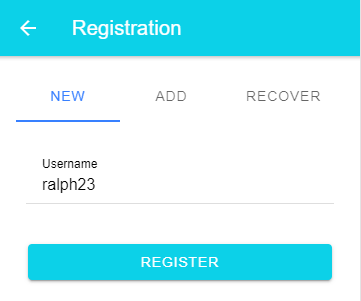
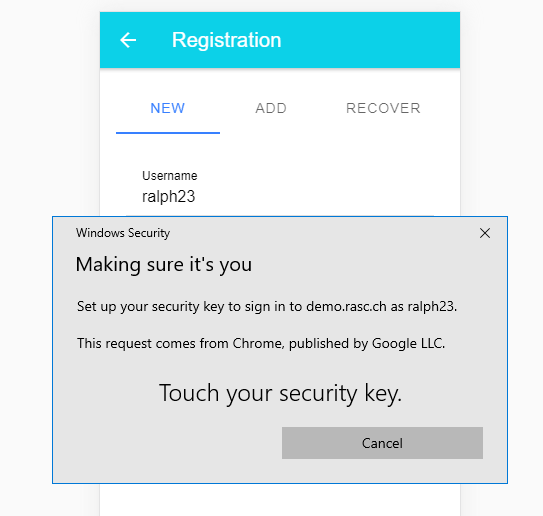
For sign-in, the user taps the passkey button and the browser or operating system presents the available discoverable credentials for the current relying party.
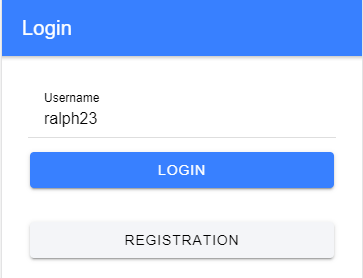
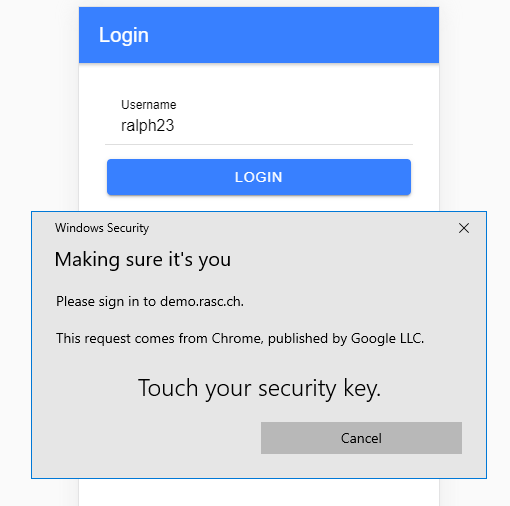
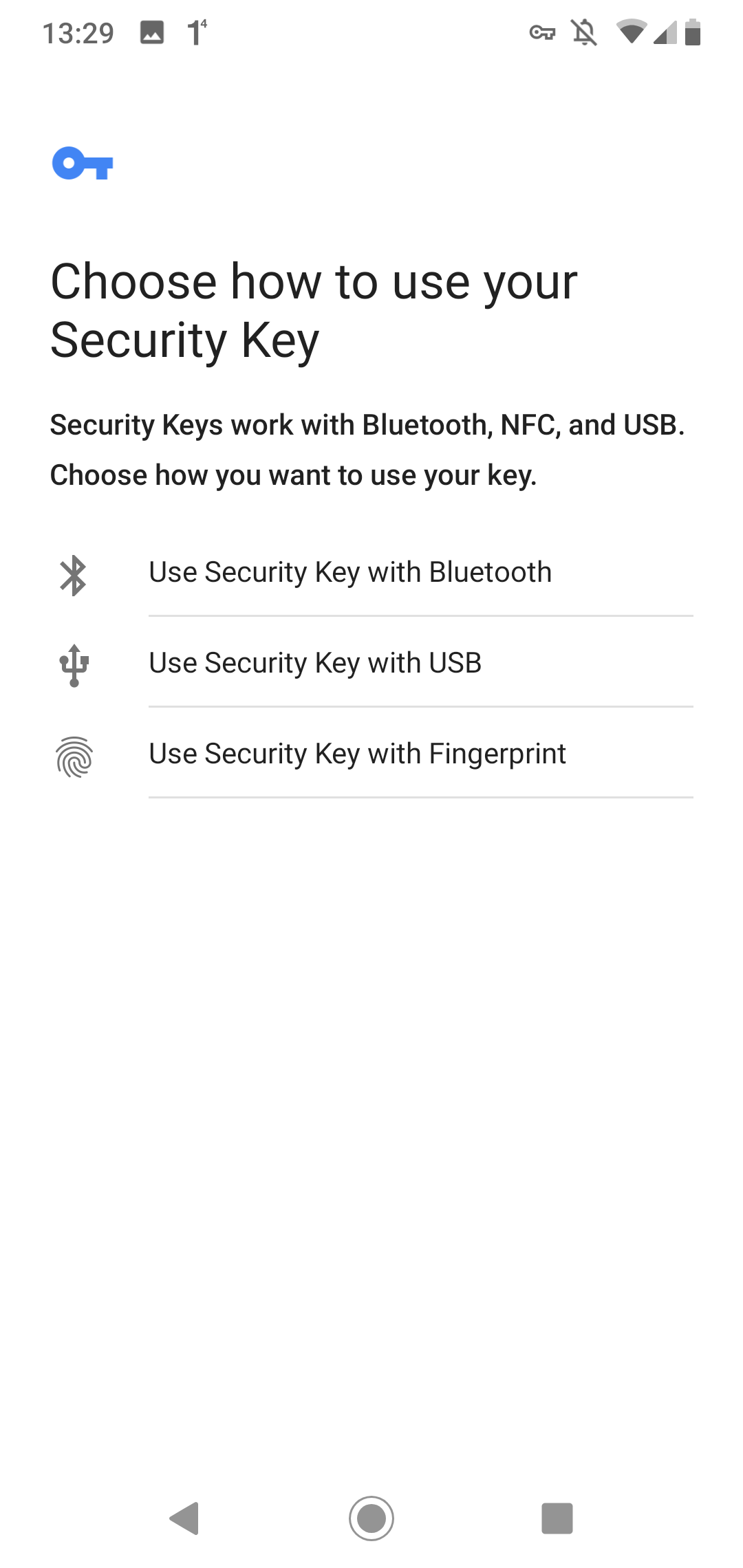
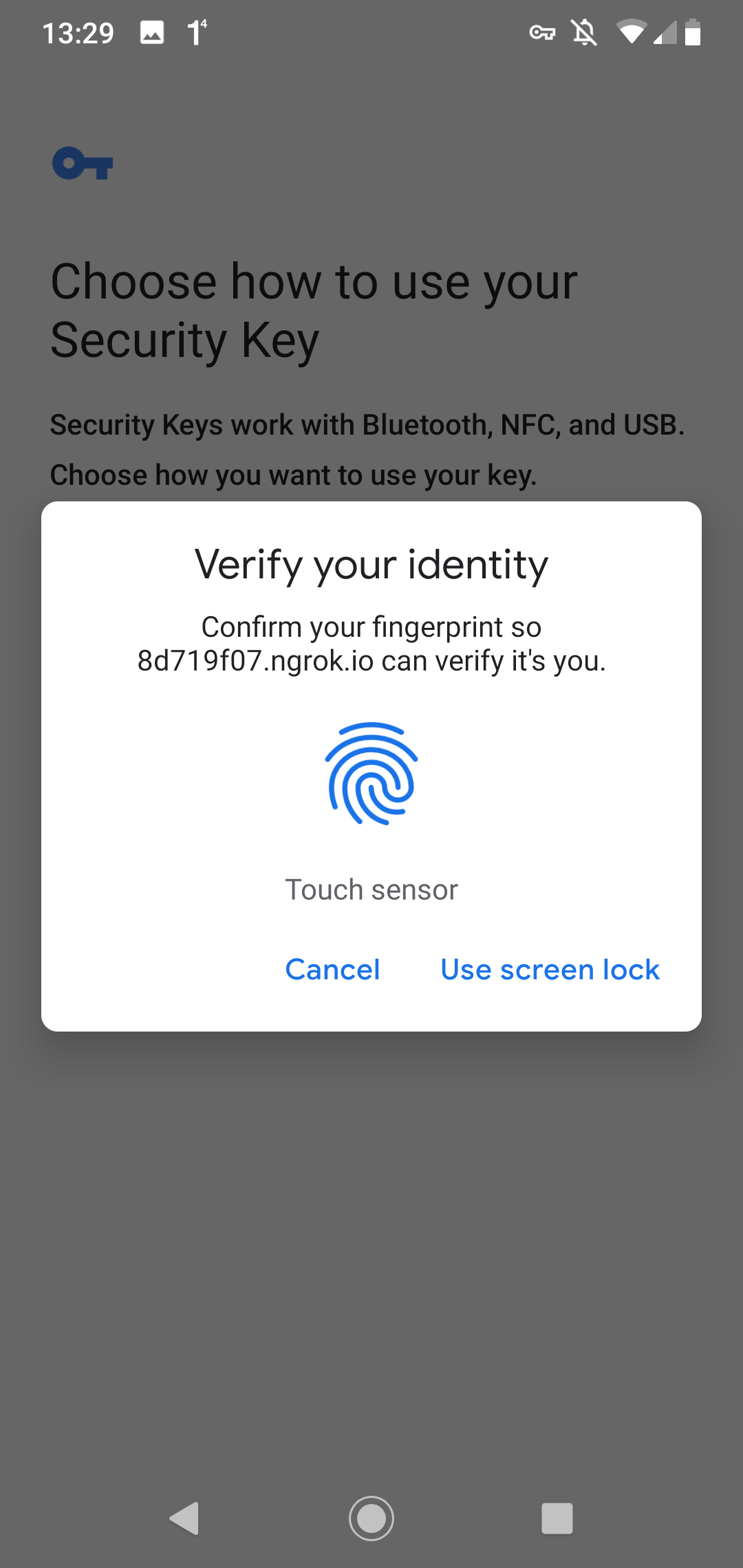
On Android, the user experience looks a bit different, but the flow is the same.
Registration

Login
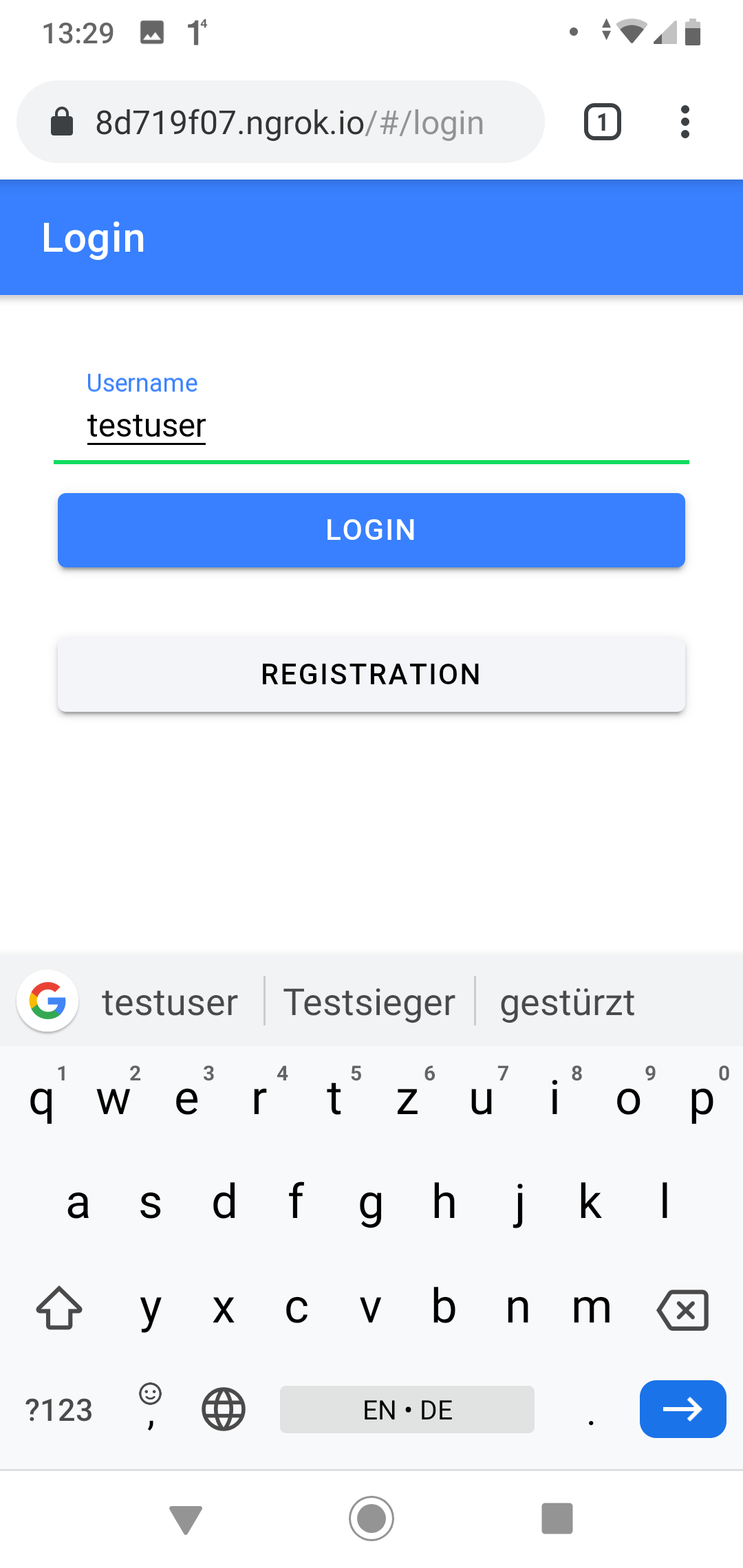
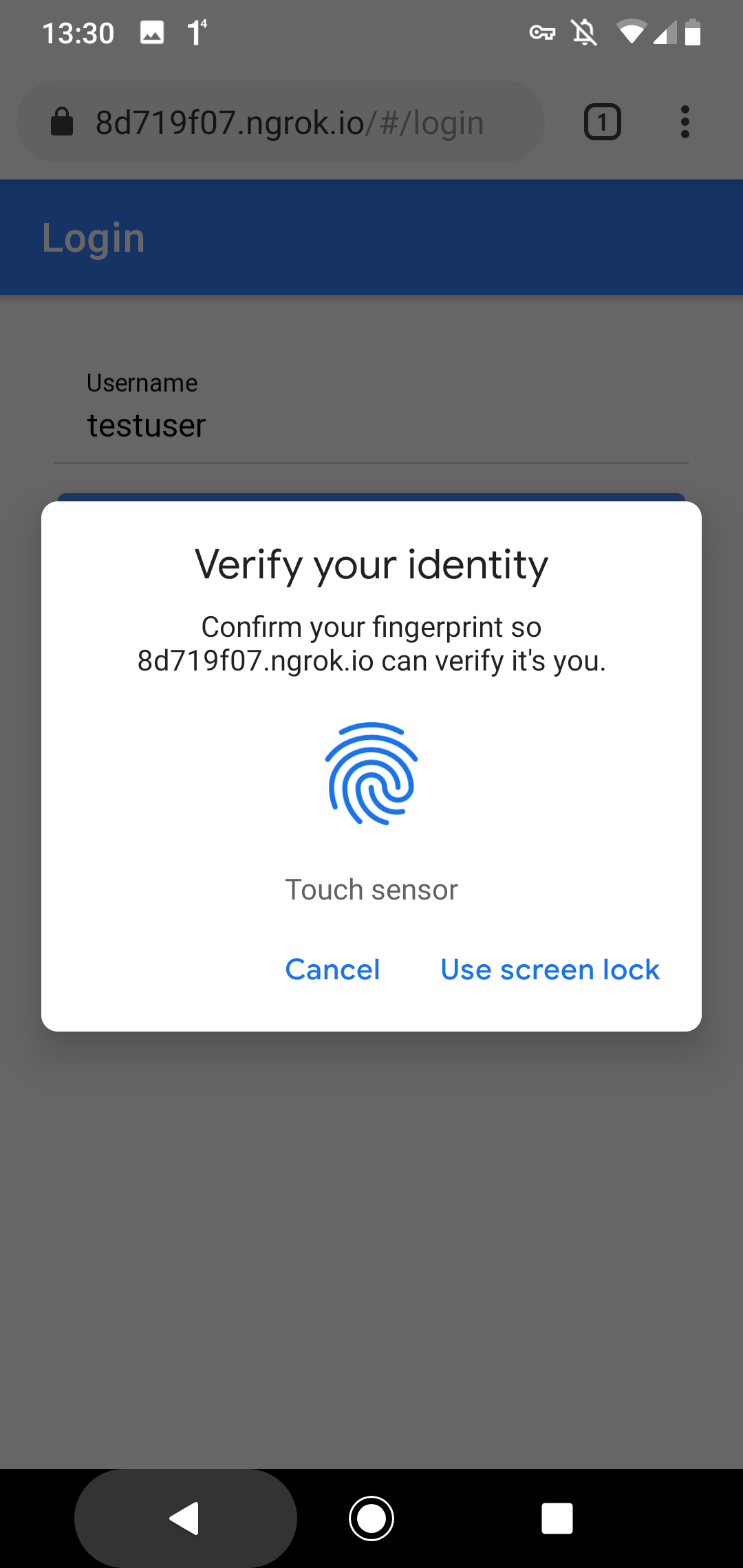
WebAuthn is not the same thing as biometric authentication. User verification may use a fingerprint, face recognition, a PIN, or the device credential, depending on the platform and the authenticator.
Source Code 
The source code for the demo application is stored in this GitHub repository: https://github.com/ralscha/webauthn-demo
The Spring Boot application lives in the server folder. For local development, first start PostgreSQL with docker compose up, then start the application from your IDE or with mvnw spring-boot:run. The server listens on port 8080.
The web application is in the client folder. Run npm install once, then start it with npm start. The application is served from port 4200.
The repository's task verify command runs the configured client and server checks. task build builds Angular first and packages its output into the executable Spring Boot JAR. For a production deployment, override the relying-party ID and origins, PostgreSQL connection, and secure session-cookie settings; WebAuthn requires HTTPS outside localhost.
Because the two applications run on different origins during development, the client uses an Angular dev proxy instead of enabling CORS on the server. The proxy is enabled through the proxyConfig option in angular.json.
        "serve": {
          "builder": "@angular/build:dev-server",
          "options": {
            "proxyConfig": "proxy.conf.json",
            "buildTarget": "app:build"
          },
Libraries 
On the server, I use the Yubico java-webauthn-server library to create WebAuthn options and validate registration and assertion responses.
    <dependency>
      <groupId>com.yubico</groupId>
      <artifactId>webauthn-server-core</artifactId>
      <version>2.9.0</version>
    </dependency>
    <dependency>
      <groupId>com.yubico</groupId>
      <artifactId>yubico-util</artifactId>
      <version>2.9.0</version>
    </dependency>
On the client, the application uses the browser-native WebAuthn APIs directly. No additional WebAuthn library is required.
Implementation details 
The Yubico library requires an implementation of the CredentialRepository interface.
You find my implementation here: JooqCredentialRepository.java
The library uses this implementation to read existing credentials and to verify assertions.
The library also needs a RelyingParty instance. The demo application creates it as a Spring bean.
The two important properties are RelyingPartyIdentity.id and RelyingParty.origins.
The id must be the effective domain of your application, for example localhost or example.com, without scheme or port. The browser validates this value during both navigator.credentials.create() and navigator.credentials.get().
The origins property contains the full allowed origins, for example http://localhost:4200 or https://app.example.com. The server validates the origin against this collection.
  @Bean
  public RelyingParty relyingParty(JooqCredentialRepository credentialRepository,
      AppProperties appProperties) {

    RelyingPartyIdentity rpIdentity = RelyingPartyIdentity.builder()
        .id(appProperties.getRelyingPartyId()).name(appProperties.getRelyingPartyName())
        .build();

    return RelyingParty.builder().identity(rpIdentity)
        .credentialRepository(credentialRepository)
        .origins(appProperties.getRelyingPartyOrigins()).build();
  }
I externalized these settings with a @ConfigurationProperties annotated POJO, AppProperties.java, so they can be changed in application.properties or from the command line.
For local testing on localhost, I use these values.
app.relying-party-id=localhost
app.relying-party-name=Example Application
app.relying-party-origins=http://localhost:4200
The demo creates discoverable credentials by setting residentKey to REQUIRED and userVerification to PREFERRED during registration.
    byte[] webAuthnIdBytes = new byte[64];
    this.random.nextBytes(webAuthnIdBytes);
    ByteArray webAuthnId = new ByteArray(webAuthnIdBytes);

    PublicKeyCredentialCreationOptions credentialCreation = this.relyingParty
        .startRegistration(StartRegistrationOptions.builder()
            .user(UserIdentity.builder().name(name).displayName(name).id(webAuthnId)
                .build())
            .authenticatorSelection(AuthenticatorSelectionCriteria.builder()
                .residentKey(ResidentKeyRequirement.REQUIRED)
                .userVerification(UserVerificationRequirement.PREFERRED).build())
            .build());
Entities 
The application stores users and credentials in a relational database.
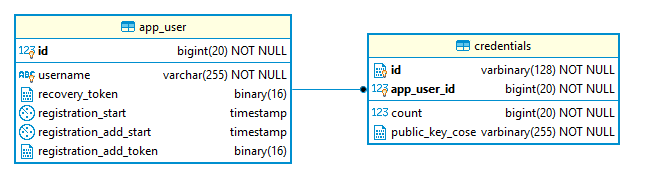
For WebAuthn itself, the essential user fields are app_user.id and app_user.username. Each user can own multiple credentials, so there is a one-to-many relationship between app_user and credentials.
In the credentials table, the application stores the credential ID, the WebAuthn user handle, the public key, the optional transports, and the authenticator's signature counter, which can help detect cloned authenticators.
Usernames are unique without regard to letter case. A database index on LOWER(username) enforces the same rule as the application's preflight check, including when two registration requests race.
CREATE UNIQUE INDEX app_user_username_lower_uq ON app_user (LOWER(username));
V0002__case_insensitive_username.sql
The application uses jOOQ and Flyway for database access and schema management. If you are interested in that setup, check out my blog post about jOOQ, Flyway, and Spring Boot.
Registration 
Overview of the registration process.
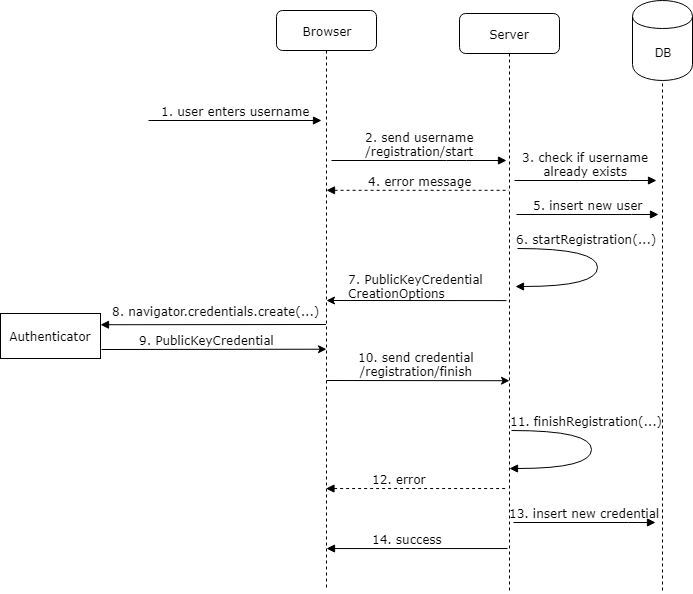
Registration requires two round trips from the client to the server.
First, the client sends a POST request to /registration/start. The endpoint accepts exactly one of two inputs: a username for a new account or a recovery token for an existing account. It normalizes and validates that input, checks usernames case-insensitively, and verifies that recovery tokens decode to the expected 16 bytes.
  @PostMapping("/registration/start")
  public RegistrationStartResponse registrationStart(
      @RequestParam(name = "username", required = false) String username,
      @RequestParam(name = "recoveryToken", required = false) String recoveryToken) {

    Long userId = null;
    byte[] recoveryTokenBytes = null;
    String name = null;
    Mode mode = null;

    String normalizedUsername = username == null ? null : username.strip();
    String normalizedRecoveryToken = recoveryToken == null ? null
        : recoveryToken.strip();
    boolean hasUsername = normalizedUsername != null && !normalizedUsername.isEmpty();
    boolean hasRecoveryToken = normalizedRecoveryToken != null
        && !normalizedRecoveryToken.isEmpty();

    if (hasUsername == hasRecoveryToken) {
      return new RegistrationStartResponse(
          RegistrationStartResponse.Status.INVALID_REQUEST);
    }

    if (hasUsername) {
      if (normalizedUsername.length() > 255) {
        return new RegistrationStartResponse(
            RegistrationStartResponse.Status.INVALID_REQUEST);
      }

      int count = this.dsl.selectCount().from(APP_USER)
          .where(APP_USER.USERNAME.equalIgnoreCase(normalizedUsername))
          .fetchOne(0, int.class);
      if (count > 0) {
        return new RegistrationStartResponse(
            RegistrationStartResponse.Status.USERNAME_TAKEN);
      }

      name = normalizedUsername;
      mode = Mode.NEW;
    }
    else {
      try {
        recoveryTokenBytes = Base58.decode(normalizedRecoveryToken);
      }
      catch (Exception e) {
        return new RegistrationStartResponse(
            RegistrationStartResponse.Status.TOKEN_INVALID);
      }

      if (recoveryTokenBytes.length != 16) {
        return new RegistrationStartResponse(
            RegistrationStartResponse.Status.TOKEN_INVALID);
      }

      var record = this.dsl.select(APP_USER.ID, APP_USER.USERNAME).from(APP_USER)
          .where(APP_USER.RECOVERY_TOKEN.eq(recoveryTokenBytes)).fetchOne();

      if (record == null) {
        return new RegistrationStartResponse(
            RegistrationStartResponse.Status.TOKEN_INVALID);
      }

      userId = record.get(APP_USER.ID);
      name = record.get(APP_USER.USERNAME);
      mode = Mode.RECOVERY;
    }
This first request does not change the database. For a new account, the server only checks whether the username is available. For recovery, it only resolves the token to the existing user. Account creation and credential replacement wait until the authenticator response has been validated.
Next, the handler calls startRegistration() on the RelyingParty bean. It builds a UserIdentity and gets back a PublicKeyCredentialCreationOptions instance with a fresh random challenge.
    byte[] webAuthnIdBytes = new byte[64];
    this.random.nextBytes(webAuthnIdBytes);
    ByteArray webAuthnId = new ByteArray(webAuthnIdBytes);

    PublicKeyCredentialCreationOptions credentialCreation = this.relyingParty
        .startRegistration(StartRegistrationOptions.builder()
            .user(UserIdentity.builder().name(name).displayName(name).id(webAuthnId)
                .build())
            .authenticatorSelection(AuthenticatorSelectionCriteria.builder()
                .residentKey(ResidentKeyRequirement.REQUIRED)
                .userVerification(UserVerificationRequirement.PREFERRED).build())
            .build());

    RegistrationStartResponse startResponse = new RegistrationStartResponse(mode,
        newRequestId(), credentialCreation);

    this.registrationCache.put(startResponse.getRegistrationId(),
        new PendingRegistration(startResponse, userId,
            recoveryTokenBytes == null ? null : new ByteArray(recoveryTokenBytes)));

    return startResponse;
The response also contains a cryptographically random request ID. The demo stores the options and pending account data under that ID in a Caffeine in-memory cache for five minutes because the server needs the same state when it validates the second request.
    this.registrationCache = Caffeine.newBuilder().maximumSize(1000)
        .expireAfterWrite(5, TimeUnit.MINUTES).build();
    this.assertionCache = Caffeine.newBuilder().maximumSize(1000)
        .expireAfterWrite(5, TimeUnit.MINUTES).build();
That approach is fine for a single-instance demo. In a multi-instance deployment, use a shared store and preserve the same expiration and atomic consume-on-read behavior.
The client receives a JSON response, reconstructs the PublicKeyCredentialCreationOptions with PublicKeyCredential.parseCreationOptionsFromJSON(), calls navigator.credentials.create(), and serializes the returned PublicKeyCredential back to JSON with toJSON().
  private async createCredentials(response: SuccessfulRegistrationStartResponse): Promise<void> {
    let credential: PublicKeyCredentialJSON;
    try {
      const publicKey = PublicKeyCredential.parseCreationOptionsFromJSON(
        response.publicKeyCredentialCreationOptions,
      );
      const cred = (await navigator.credentials.create({
        publicKey,
      })) as PublicKeyCredential | null;
      if (!cred) {
        return;
      }
      credential = cred.toJSON();
    } catch (error) {
      if (!isExpectedCredentialError(error)) {
        await this.messagesService.showErrorToast('Registration failed');
      }
      return;
    }

    const credentialResponse = {
      registrationId: response.registrationId,
      credential,
    };

    const loading = await this.messagesService.showLoading('Finishing registration ...');

    try {
      const recoveryToken = await firstValueFrom(
        this.httpClient.post('registration/finish', credentialResponse, { responseType: 'text' }),
      );

      if (recoveryToken) {
        this.recoveryToken.set(recoveryToken);
      } else {
        await this.messagesService.showErrorToast('Registration failed');
      }
    } catch {
      await this.messagesService.showErrorToast('Registration failed');
    } finally {
      await loading.dismiss();
    }
The browser talks to the authenticator and returns an AuthenticatorAttestationResponse that contains the attestation data and the newly created public key material.
The application sends that JSON payload to /registration/finish.
On the server, the finish endpoint atomically removes the cached request before calling finishRegistration(). Consequently, an expired request ID or an attempt to replay a finish request is rejected.
  @PostMapping("/registration/finish")
  public ResponseEntity<String> registrationFinish(
      @Valid @RequestBody RegistrationFinishRequest finishRequest) {

    PendingRegistration pending = this.registrationCache.asMap()
        .remove(finishRequest.getRegistrationId());
    if (pending == null) {
      Application.log.warn("Expired or already consumed registration request");
      return ResponseEntity.badRequest().build();
    }

    RegistrationResult registrationResult;
    try {
      registrationResult = this.relyingParty
          .finishRegistration(FinishRegistrationOptions.builder()
              .request(pending.startResponse()
                  .getPublicKeyCredentialCreationOptions())
              .response(finishRequest.getCredential()).build());
    }
    catch (RegistrationFailedException | IllegalArgumentException e) {
      Application.log.warn("Registration verification failed: {}", e.getMessage());
      return ResponseEntity.badRequest().build();
    }

    try {
      String newRecoveryToken = this.transactionTemplate.execute(status ->
          persistRegistration(pending, registrationResult, finishRequest));
      if (newRecoveryToken == null) {
        return ResponseEntity.status(HttpStatus.CONFLICT).build();
      }
      return ResponseEntity.ok(newRecoveryToken);
    }
    catch (DataAccessException | org.springframework.dao.DataAccessException e) {
      Application.log.warn("Could not persist registration: {}", e.getMessage());
      return ResponseEntity.status(HttpStatus.CONFLICT).build();
    }
  }
If validation fails, the Yubico library throws a RegistrationFailedException.
Only after successful WebAuthn validation does the application open a database transaction. A new flow inserts the user and credential together. A recovery flow compares and rotates the recovery token, deletes the old credentials, and inserts the replacement credential in that same transaction. If any write fails, the entire change rolls back; canceling a start request therefore neither reserves a username nor destroys a working passkey.
  private String persistRegistration(PendingRegistration pending,
      RegistrationResult registrationResult,
      RegistrationFinishRequest finishRequest) {
    byte[] newRecoveryToken = new byte[16];
    this.random.nextBytes(newRecoveryToken);

    RegistrationStartResponse startResponse = pending.startResponse();
    UserIdentity userIdentity = startResponse.getPublicKeyCredentialCreationOptions()
        .getUser();

    Long userId = pending.userId();
    if (startResponse.getMode() == Mode.NEW) {
      var insertedUser = this.dsl
          .insertInto(APP_USER, APP_USER.USERNAME, APP_USER.RECOVERY_TOKEN)
          .values(userIdentity.getName(), newRecoveryToken).returning(APP_USER.ID)
          .fetchOne();
      if (insertedUser == null) {
        throw new IllegalStateException("Failed to create user");
      }
      userId = insertedUser.getId();
    }
    else {
      int updated = this.dsl.update(APP_USER)
          .set(APP_USER.RECOVERY_TOKEN, newRecoveryToken)
          .where(APP_USER.ID.eq(userId)
              .and(APP_USER.RECOVERY_TOKEN.eq(pending.recoveryToken().getBytes())))
          .execute();
      if (updated != 1) {
        return null;
      }
      this.dsl.deleteFrom(CREDENTIALS).where(CREDENTIALS.APP_USER_ID.eq(userId))
          .execute();
    }

    String transports = registrationResult.getKeyId().getTransports()
        .map(values -> values.stream().map(transport -> transport.getId())
            .collect(Collectors.joining(",")))
        .filter(value -> !value.isEmpty()).orElse(null);

    this.credentialRepository.addCredential(userId, userIdentity.getId().getBytes(),
        registrationResult.getKeyId().getId().getBytes(),
        registrationResult.getPublicKeyCose().getBytes(), transports,
        finishRequest.getCredential().getResponse().getParsedAuthenticatorData()
            .getSignatureCounter());

    return Base58.encode(newRecoveryToken);
  }
Sign-In 
The sign-in flow looks very similar to registration.
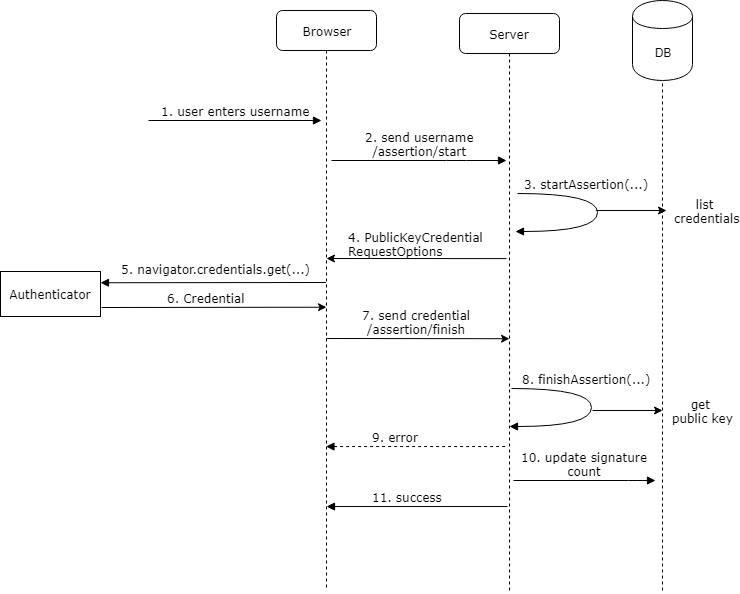
This demo uses discoverable credentials, so the assertion flow itself does not require a username. To showcase passkey autofill, the login page includes a username field with autocomplete="username webauthn" and also keeps a dedicated passkey button as a fallback.
      <label class="form-control w-full gap-2">
        <span class="label-text">Username</span>
        <input
          autocomplete="username webauthn"
          class="input w-full"
          name="username"
          placeholder="Tap here to show passkeys in autofill"
          type="text"
        />
      </label>

      <button
        (click)="signIn()"
        [disabled]="signingIn() || !passkeySupported"
        class="btn btn-primary btn-block"
        type="button"
      >
        @if (signingIn()) {
          <span class="loading loading-spinner loading-sm"></span>
        }
The application first sends a POST request to /assertion/start. The server calls startAssertion() to create an AssertionRequest, which internally contains a PublicKeyCredentialRequestOptions instance and a new random challenge.
  @PostMapping("/assertion/start")
  public AssertionStartResponse start() {
    AssertionRequest assertionRequest = this.relyingParty
        .startAssertion(StartAssertionOptions.builder()
            .userVerification(UserVerificationRequirement.PREFERRED).build());

    AssertionStartResponse response = new AssertionStartResponse(newRequestId(),
        assertionRequest);

    this.assertionCache.put(response.getAssertionId(), response);
    return response;
  }
Like in the registration flow, the server caches this object because it has to pass the same request into finishAssertion(). The finish endpoint removes it atomically, so an assertion challenge is single-use even when validation fails.
The client reconstructs the request object with PublicKeyCredential.parseRequestOptionsFromJSON(), calls navigator.credentials.get(), converts the returned credential to JSON with toJSON(), and posts it to /assertion/finish. The login page does this in two modes: an explicit button-triggered sign-in and a conditional-mediation autofill flow started when the page loads.
  async signIn(): Promise<void> {
    if (this.signingIn()) {
      return;
    }
    if (!this.passkeySupported) {
      await this.messagesService.showErrorToast('Passkeys are not supported by this browser');
      return;
    }

    this.signingIn.set(true);
    this.abortConditionalMediation();

    const loading = await this.messagesService.showLoading('Initiate login ...');
    try {
      const response = await firstValueFrom(
        this.httpClient.post<AssertionStartResponse>('assertion/start', null),
      );
      await loading.dismiss();
      await this.handleAssertionStart(response);
    } catch {
      await this.messagesService.showErrorToast('Login failed');
    } finally {
      await loading.dismiss();
      this.signingIn.set(false);
      if (this.router.url.startsWith('/login')) {
        void this.startPasskeyAutofill();
      }
    }
  }

  private async handleAssertionStart(response: AssertionStartResponse): Promise<void> {
    try {
      const publicKey = PublicKeyCredential.parseRequestOptionsFromJSON(
        response.publicKeyCredentialRequestOptions,
      );
      const credential = (await navigator.credentials.get({
        publicKey,
      })) as PublicKeyCredential | null;

      if (!credential) {
        return;
      }

      await this.finishAssertion(response.assertionId, credential.toJSON());
    } catch (error) {
      if (!isExpectedCredentialError(error)) {
        await this.messagesService.showErrorToast('Login failed');
      }
    }
  }
  private async startPasskeyAutofill(): Promise<void> {
    if (
      !this.passkeySupported ||
      this.conditionalMediationAbortController !== null ||
      typeof PublicKeyCredential.isConditionalMediationAvailable !== 'function'
    ) {
      return;
    }

    const abortController = new AbortController();
    this.conditionalMediationAbortController = abortController;

    try {
      this.conditionalMediationAvailable.set(
        await PublicKeyCredential.isConditionalMediationAvailable(),
      );

      if (!this.conditionalMediationAvailable()) {
        return;
      }

      const response = await firstValueFrom(
        this.httpClient.post<AssertionStartResponse>('assertion/start', null),
      );
      if (abortController.signal.aborted) {
        return;
      }

      const publicKey = PublicKeyCredential.parseRequestOptionsFromJSON(
        response.publicKeyCredentialRequestOptions,
      );

      const credential = (await navigator.credentials.get({
        publicKey,
        mediation: 'conditional',
        signal: abortController.signal,
      })) as PublicKeyCredential | null;

      if (!credential) {
        return;
      }

      await this.finishAssertion(response.assertionId, credential.toJSON());
    } catch (error) {
      if (!isExpectedCredentialError(error)) {
        await this.messagesService.showErrorToast('Passkey autofill failed');
      }
    } finally {
      if (this.conditionalMediationAbortController === abortController) {
        this.conditionalMediationAbortController = null;
      }
    }
  }

  private async finishAssertion(
    assertionId: string,
    credential: PublicKeyCredentialJSON,
  ): Promise<void> {
    const assertionResponse = {
      assertionId,
      credential,
    };

    const loading = await this.messagesService.showLoading('Validating ...');

    try {
      const ok = await firstValueFrom(
        this.httpClient.post<boolean>('assertion/finish', assertionResponse, {
          withCredentials: true,
        }),
      );
      if (ok) {
        await this.router.navigateByUrl('/home', { replaceUrl: true });
      } else {
        await this.messagesService.showErrorToast('Login failed');
      }
    } catch {
      await this.messagesService.showErrorToast('Login failed');
    } finally {
      await loading.dismiss();
    }
  }
The authenticator returns an AuthenticatorAssertionResponse, which contains the signed challenge and authenticator data. The server validates the signature with the stored public key and updates the signature counter in the credentials table.
  @PostMapping("/assertion/finish")
  public boolean finish(@Valid @RequestBody AssertionFinishRequest finishRequest,
      HttpServletRequest request, HttpServletResponse response) {

    AssertionStartResponse startResponse = this.assertionCache.asMap()
        .remove(finishRequest.getAssertionId());

    if (startResponse == null) {
      Application.log.warn("Expired or already consumed assertion request");
      return false;
    }

    try {
      AssertionResult result = this.relyingParty.finishAssertion(
          FinishAssertionOptions.builder().request(startResponse.getAssertionRequest())
              .response(finishRequest.getCredential()).build());

      if (result.isSuccess()) {
        if (!this.credentialRepository.updateSignatureCount(result)) {
          Application.log.error(
              "Failed to update signature count for user \"{}\", credential \"{}\"",
              result.getUsername(), finishRequest.getCredential().getId());
        }

        var appUserRecordResult = this.dsl.select(APP_USER.asterisk()).from(APP_USER)
            .innerJoin(CREDENTIALS).onKey()
            .where(CREDENTIALS.WEBAUTHN_USER_ID
                .eq(result.getCredential().getUserHandle().getBytes()))
            .fetchOne();

        if (appUserRecordResult != null) {
          var appUserRecord = appUserRecordResult.into(APP_USER);
          AppUserDetail userDetail = new AppUserDetail(appUserRecord,
              new SimpleGrantedAuthority("USER"));
          AppUserAuthentication auth = new AppUserAuthentication(userDetail);
          HttpSession existingSession = request.getSession(false);
          if (existingSession != null) {
            request.changeSessionId();
          }
          SecurityContext context = SecurityContextHolder.createEmptyContext();
          context.setAuthentication(auth);
          SecurityContextHolder.setContext(context);
          this.securityContextRepository.saveContext(context, request, response);
          return true;
        }
      }
    }
    catch (AssertionFailedException | IllegalArgumentException e) {
      Application.log.warn("Assertion verification failed: {}", e.getMessage());
    }

    return false;
  }
Code example: passkey autofill with conditional mediation 
If your sign-in page also contains a username field, you can ask the browser to surface passkeys directly in the autofill UI. The HTML field needs the webauthn autocomplete token.
<input
  type="text"
  name="username"
  autocomplete="username webauthn"
>
On page load, the component checks whether conditional mediation is available, fetches assertion options, and starts navigator.credentials.get() with mediation: 'conditional'. Because that request can remain pending while the page is visible, the implementation gives it an AbortSignal. It cancels the ceremony before an explicit button-driven sign-in and when Angular destroys the page, preventing overlapping browser ceremonies and late navigation from an obsolete request.
  private async startPasskeyAutofill(): Promise<void> {
    if (
      !this.passkeySupported ||
      this.conditionalMediationAbortController !== null ||
      typeof PublicKeyCredential.isConditionalMediationAvailable !== 'function'
    ) {
      return;
    }

    const abortController = new AbortController();
    this.conditionalMediationAbortController = abortController;

    try {
      this.conditionalMediationAvailable.set(
        await PublicKeyCredential.isConditionalMediationAvailable(),
      );

      if (!this.conditionalMediationAvailable()) {
        return;
      }

      const response = await firstValueFrom(
        this.httpClient.post<AssertionStartResponse>('assertion/start', null),
      );
      if (abortController.signal.aborted) {
        return;
      }

      const publicKey = PublicKeyCredential.parseRequestOptionsFromJSON(
        response.publicKeyCredentialRequestOptions,
      );

      const credential = (await navigator.credentials.get({
        publicKey,
        mediation: 'conditional',
        signal: abortController.signal,
      })) as PublicKeyCredential | null;

      if (!credential) {
        return;
      }

      await this.finishAssertion(response.assertionId, credential.toJSON());
    } catch (error) {
      if (!isExpectedCredentialError(error)) {
        await this.messagesService.showErrorToast('Passkey autofill failed');
      }
    } finally {
      if (this.conditionalMediationAbortController === abortController) {
        this.conditionalMediationAbortController = null;
      }
    }
  }

  private async finishAssertion(
    assertionId: string,
    credential: PublicKeyCredentialJSON,
  ): Promise<void> {
    const assertionResponse = {
      assertionId,
      credential,
    };

    const loading = await this.messagesService.showLoading('Validating ...');

    try {
      const ok = await firstValueFrom(
        this.httpClient.post<boolean>('assertion/finish', assertionResponse, {
          withCredentials: true,
        }),
      );
      if (ok) {
        await this.router.navigateByUrl('/home', { replaceUrl: true });
      } else {
        await this.messagesService.showErrorToast('Login failed');
      }
    } catch {
      await this.messagesService.showErrorToast('Login failed');
    } finally {
      await loading.dismiss();
    }
  }

  private abortConditionalMediation(): void {
    this.conditionalMediationAbortController?.abort();
    this.conditionalMediationAbortController = null;
  }
The important detail is that you omit allowCredentials on the request. That is what allows the browser and authenticator to discover matching passkeys for the current relying party and show them in autofill.
Spring Security 
After a successful assertion, the application signs the user into Spring Security by creating an AppUserDetail and an AppUserAuthentication. Before saving the new security context, it changes the existing HTTP session ID to protect against session fixation.
        if (appUserRecordResult != null) {
          var appUserRecord = appUserRecordResult.into(APP_USER);
          AppUserDetail userDetail = new AppUserDetail(appUserRecord,
              new SimpleGrantedAuthority("USER"));
          AppUserAuthentication auth = new AppUserAuthentication(userDetail);
          HttpSession existingSession = request.getSession(false);
          if (existingSession != null) {
            request.changeSessionId();
          }
          SecurityContext context = SecurityContextHolder.createEmptyContext();
          context.setAuthentication(auth);
          SecurityContextHolder.setContext(context);
          this.securityContextRepository.saveContext(context, request, response);
          return true;
To complete the integration, the application disables Spring Security's built-in authentication flow because the Authentication object inserted into the security context is already authenticated.
Providing a minimal AuthenticationManager bean is enough.
  @Bean
  AuthenticationManager authenticationManager() {
    return authentication -> {
      throw new AuthenticationServiceException("Cannot authenticate " + authentication);
    };
  }
The application uses the JSESSIONID session cookie to persist the login. WebAuthn does not change that part of the architecture. After the assertion is verified, you can continue with a normal session-based or token-based application design.
The security configuration enables Spring Security's SPA-oriented CSRF support. During startup, the Angular application calls /csrf to materialize the token cookie; Angular then copies that token into the header of same-origin POST requests. Logout is POST-only, returns a status code instead of redirecting, and deletes the session cookie. The registration and assertion endpoints remain public, while protected endpoints return HTTP 401 when there is no authenticated session.
  @Bean
  public SecurityFilterChain filterChain(HttpSecurity http) throws Exception {
    http.csrf(csrf -> csrf.spa())
        .securityContext(securityContext -> securityContext
            .securityContextRepository(delegatingSecurityContextRepository()))
        .logout(customizer -> {
          customizer.logoutRequestMatcher(
              PathPatternRequestMatcher.pathPattern(HttpMethod.POST, "/logout"));
          customizer.logoutSuccessHandler(new HttpStatusReturningLogoutSuccessHandler());
          customizer.deleteCookies("JSESSIONID");
        }).authorizeHttpRequests(customizer -> {
          customizer.requestMatchers("/", "/assets/**", "/svg/**", "/*.br", "/*.gz",
              "/*.html", "/*.js", "/*.css").permitAll();
          customizer.requestMatchers("/csrf", "/registration/*", "/assertion/*")
              .permitAll();
          customizer.anyRequest().authenticated();
        }).exceptionHandling(customizer -> customizer
            .authenticationEntryPoint(new HttpStatusEntryPoint(HttpStatus.UNAUTHORIZED)));
    return http.build();
bootstrapApplication(AppComponent, {
  providers: [
    provideRouter(routes, withHashLocation(), withPreloading(PreloadAllModules)),
    provideHttpClient(withXhr(), withInterceptorsFromDi()),
    provideAppInitializer(() =>
      firstValueFrom(inject(HttpClient).get('csrf')).catch(() => undefined),
    ),
Recovery 
The demo includes a simple recovery workflow. After a successful registration, the server generates 16 random bytes, stores them in app_user.recovery_token, Base58-encodes the value, and returns it to the client. The code is displayed once, so the user must save it before leaving the page.
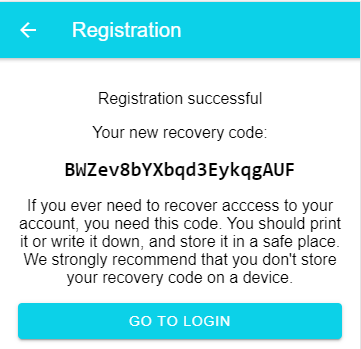
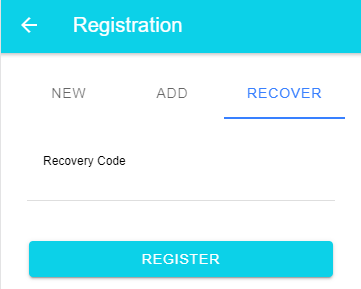
If the user loses access to the authenticator, they can open the recovery view on the registration page and enter that code. The start request resolves the account but leaves its existing credentials untouched. Only a successfully validated finish request atomically replaces those credentials and rotates the recovery token. Comparing the submitted token again during the update also means that two concurrent attempts cannot reuse the same recovery code.
Conclusion 
WebAuthn gives us a clean way to build passwordless sign-in with phishing-resistant public-key cryptography. With Spring Boot on the server and a small amount of browser-side code in Angular, it is very feasible to build a passkey-based login flow without introducing much application-specific complexity.
The source code for the demo application is hosted on GitHub:
https://github.com/ralscha/webauthn-demo/
If you find bugs or have a question, open an issue or send me a message.