In a previous blog post I showed you how to write a Go program that posts to Bluesky. In this post, I will show you how to write a Reply Bot that replies to posts on Bluesky. This bot is also written in Go.
Workflow 
To mention someone on Bluesky, you insert the @ symbol followed by their handle into the post. The mentioned user will receive a notification that they have been mentioned.
The bot will periodically poll Bluesky for these mentions and extract the body text and sender from each post. It then sends the text to the Gemini 2.5 Flash model and replies to the sender with the generated response.
Setup 
After initializing the program with go mod init blueskyreplybot, we will need to install the following packages:
go get github.com/bluesky-social/indigo
go get github.com/firebase/genkit/go
go get github.com/joho/godotenv
The indigo package allows us to interact with the Bluesky API, genkit is used for accessing the Gemini API, and
godotenv is used for loading environment variables from a .env file. For this application, I put the following
environment variables in the .env file:
BLUESKY_IDENTIFIER=did:...
BLUESKY_PASSWORD=n...
GEMINI_API_KEY=A....
Note that the Bluesky identifier is a DID (Decentralized Identifier), not the handle you see in the Bluesky app, like @example.bsky.social.
To get the DID from a handle, you can call this endpoint:
curl -X GET "https://bsky.social/xrpc/com.atproto.identity.resolveHandle?handle=<handle>"
For the password, it is recommended to create an app password instead of using your main password. To create an app password, log in to the Bluesky app and go to Settings, then Privacy and Security, and then App Passwords.
The Gemini API key can be obtained from the Google AI Studio.
In the Go program, load these environment variables using the godotenv library:
  err := godotenv.Load()
  if err != nil {
    log.Fatal("Error loading .env file")
  }
Then access them using os.Getenv:
    blueskyIdentifier := os.Getenv("BLUESKY_IDENTIFIER")
    blueskyPassword := os.Getenv("BLUESKY_PASSWORD")
    geminiApiKey := os.Getenv("GEMINI_API_KEY")
Instead of using godotenv, you can set these environment variables directly in your shell or use a different method to load them.
Main loop 
The main loop of the bot will run indefinitely, checking for new notifications every minute. In each iteration, it will create an authenticated Bluesky client, check for notifications, and process any messages found.
  for range ticker.C {
    authClient, auth, err := createAuthenticatedBlueskyClient()
    if err != nil {
      log.Fatal("Error creating authenticated Bluesky client:", err)
    }

    notifications, err := checkNotifications(authClient)
    if err != nil {
      log.Fatal("Error checking notifications:", err)
    }

    for _, notif := range notifications {
      processNotification(authClient, auth, genkitInstance, notif)
    }
  }
}
Retrieving notifications 
The bot uses the following code to check for mentioned posts. If someone mentions a user, they will see these
posts in their notifications. The Bluesky API provides the NotificationListNotifications method to list notifications.
The type of notification is determined by the reason field. Bluesky supports several notification types like:
like, repost, follow, mention, reply, quote, starterpack-joined, verified, unverified.
Because our bot is only interested in mentions, it will filter the notifications by the mention reason.
The code also sets a limit of five notifications per request to avoid fetching too many at once. If there are more than five
notifications, the NotificationListNotifications method will return a cursor that can be used to fetch the next batch of notifications.
Each notification can be either read or unread. The IsRead field indicates whether the notification has been read or not.
The code loops through the notifications and collects all unread notifications until it finds a read notification or there are no more notifications to fetch.
After collecting all unread notifications, the bot marks them as seen by calling the NotificationUpdateSeen method. The next time this method runs, it will not fetch previously retrieved notifications.
func checkNotifications(authClient *xrpc.Client) ([]*bsky.NotificationListNotifications_Notification, error) {
  limit := int64(5)
  reasons := []string{"mention"}
  cursor := ""
  var allUnreadNotifications []*bsky.NotificationListNotifications_Notification

  for {
    notificationsList, err := bsky.NotificationListNotifications(context.Background(), authClient, cursor, limit, false, reasons, "")
    if err != nil {
      return nil, fmt.Errorf("failed to list notifications: %w", err)
    }

    if len(notificationsList.Notifications) == 0 {
      break
    }

    hasReadMessages := false
    var unreadInBatch []*bsky.NotificationListNotifications_Notification

    for _, notif := range notificationsList.Notifications {
      if notif.IsRead {
        hasReadMessages = true
      } else {
        unreadInBatch = append(unreadInBatch, notif)
      }
    }

    allUnreadNotifications = append(allUnreadNotifications, unreadInBatch...)

    if hasReadMessages {
      break
    }

    if notificationsList.Cursor == nil {
      break
    }

    cursor = *notificationsList.Cursor
  }

  if len(allUnreadNotifications) > 0 {
    seenInput := &bsky.NotificationUpdateSeen_Input{
      SeenAt: time.Now().UTC().Format(time.RFC3339),
    }

    err := bsky.NotificationUpdateSeen(context.Background(), authClient, seenInput)
    if err != nil {
      return nil, fmt.Errorf("failed to mark notifications as seen: %w", err)
    }
  }

  return allUnreadNotifications, nil
}
Generate reply with Gemini 
For each retrieved notification, the bot calls the following method. This method extracts the text from the post and cleans it up. The mentioned handle (@handle) is always part of the post text. Because this is not relevant, the code removes it from the text.
func processNotification(authClient *xrpc.Client, auth *atproto.ServerCreateSession_Output, genkitInstance *genkit.Genkit, notif *bsky.NotificationListNotifications_Notification) {
  var postText string
  feedPost, ok := notif.Record.Val.(*bsky.FeedPost)
  if !ok {
    log.Printf("Notification record is not a FeedPost: %v", notif.Record.Val)
    return
  }

  postText = feedPost.Text

  if postText == "" {
    return
  }

  cleanedText := strings.ReplaceAll(postText, "@llm.rasc.ch", "")
  cleanedText = strings.TrimSpace(cleanedText)

  if cleanedText == "" {
    return
  }
After cleaning the text, the bot sends the post text to Gemini to generate a reply.
  aiResponse, err := generateGeminiResponse(genkitInstance, cleanedText)
  if err != nil {
    log.Printf("Failed to generate AI response: %v", err)
    return
  }
Calling the Gemini API is done using the genkit library, which simplifies the interaction with the Gemini model.
All you need is to initialize a genkit instance with the Google AI plugin and the desired model.
  genkitInstance := genkit.Init(context.Background(),
    genkit.WithPlugins(&googlegenai.GoogleAI{}),
    genkit.WithDefaultModel("googleai/gemini-2.5-flash"),
  )
To send a request to the Gemini model, call genkit.Generate and pass the client instance and prompt.
The response can be extracted from the response object using resp.Text().
func generateGeminiResponse(genkitInstance *genkit.Genkit, userMessage string) (string, error) {
  prompt := fmt.Sprintf(`You are a helpful AI assistant responding to a message on Bluesky (a social media platform similar to Twitter).
Please provide a thoughtful, engaging, and helpful response to the following message.
Keep your response concise and appropriate for social media (under 280 characters when possible).

User message: %s

Response:`, userMessage)

  resp, err := genkit.Generate(context.Background(), genkitInstance, ai.WithPrompt(prompt))
  if err != nil {
    return "", fmt.Errorf("failed to generate response from Gemini: %w", err)
  }

  response := resp.Text()
  if response == "" {
    return "", fmt.Errorf("received empty response from Gemini")
  }

  return response, nil
}
To learn more about Genkit, see the documentation.
Sending reply 
After the LLM generated a response, the bot sends the reply back to the original sender on Bluesky.
This can be done using the RepoCreateRecord method from the Bluesky API. Very similar to posting
a normal message on Bluesky, the program creates a bsky.FeedPost object. But here it also fills in the Reply field
to indicate that this is a reply to an existing post. The Root and Parent fields in the ReplyRef struct
point to the original post that this new post is replying to.
func sendReply(authClient *xrpc.Client, auth *atproto.ServerCreateSession_Output, originalNotif *bsky.NotificationListNotifications_Notification, replyText string) error {

  replyRecord := bsky.FeedPost{
    Text:      replyText,
    CreatedAt: time.Now().UTC().Format(time.RFC3339),
    Reply: &bsky.FeedPost_ReplyRef{
      Root: &atproto.RepoStrongRef{
        Uri: originalNotif.Uri,
        Cid: originalNotif.Cid,
      },
      Parent: &atproto.RepoStrongRef{
        Uri: originalNotif.Uri,
        Cid: originalNotif.Cid,
      },
    },
  }

  encodedRecord := &util.LexiconTypeDecoder{Val: &replyRecord}

  _, err := atproto.RepoCreateRecord(
    context.Background(),
    authClient,
    &atproto.RepoCreateRecord_Input{
      Repo:       auth.Did,
      Collection: "app.bsky.feed.post",
      Record:     encodedRecord,
    },
  )

  return err
}
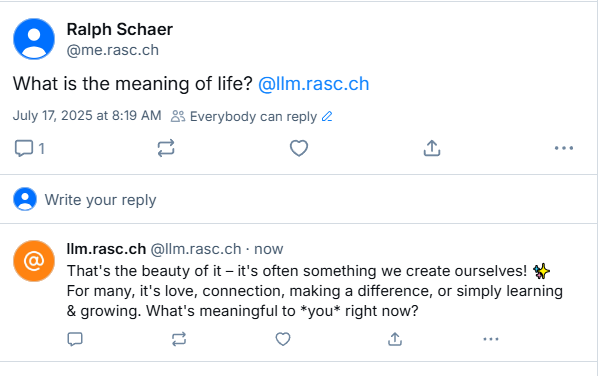
With everything in place and the bot running, when a user mentions the bot account in a post, the bot will reply with a generated response from the Gemini model. In the Bluesky app, this looks like this:
Conclusion 
In this blog post, I showed you how to create a simple Reply Bot for Bluesky using Go. The bot polls for mentions, generates replies using the Gemini 2.5 Flash model, and sends the replies back to the original sender.
Be careful when writing a reply bot that generates responses with an LLM, because it can easily generate replies that are not appropriate for the context. The bot can also easily be overwhelmed if it suddenly goes viral, especially if the bot calls a third party API that has a rate limit and costs money. So make sure to add some rate limiting to your bot to avoid unexpected costs.